 Submora
01PREPARATION CHECKLIST
Know the fields before you open the form.
Prepare the information below using the saved platform configuration. Required labels reflect that configuration; confirm the current form before submitting.
01
Project name
Required- Input
- Short text
- Form step
- Main info
- Requirements
- Maximum 45 characters.
02
Project URL
Required- Input
- Website URL
- Form step
- Main info
03
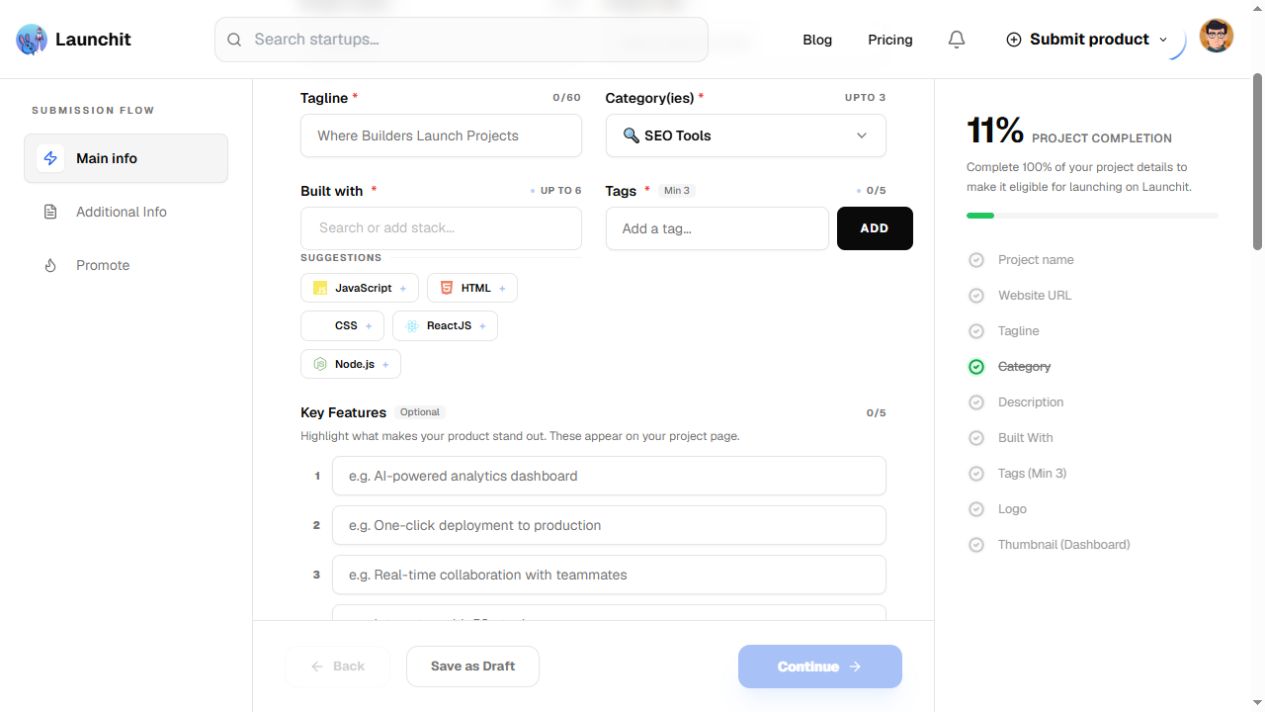
Tagline
Required- Input
- Short text
- Form step
- Main info
- Requirements
- Maximum 60 characters.
04
Category(ies)
Required- Input
- Choose multiple options
- Form step
- Main info
- Options
- 💸 Fintech · 📊 Accounting Software · 📉 Budgeting Apps · 💳 Credit Score Tools · 📅 Financial Planning · 🤝 Fundraising Resources · 📈 Investing Platforms · 🧾 Invoicing Tools · 💱 Money Transfer · 🏦 Neobanks · 🌐 Online Banking · 💼 Payroll Software · 👵 Retirement Planning · 💰 Savings Apps · 🚀 Startup Financial Planning · 📜 Startup Incorporation · 📊 Stock Trading Platforms · 🧮 Tax Preparation · 🏛️ Treasury Management · ☁️ SaaS · 🧩 Product Add-ons · 🚀 Launch Platforms · 📈 AdTech · 🧠 CRM Platforms · 📬 Email Marketing · 📢 Ad Management · 🗓️ Social Media Scheduling · 🔍 SEO Tools · 🔗 Affiliate Marketing · 📊 Analytics · 🌐 Web Analytics · 📈 Product Analytics · 🎥 Session Replay & Heatmaps · 🧪 A/B Testing & Experimentation · 📉 Dashboards & Reporting · 🧠 Business Intelligence · 📐 Data Visualization · 🎯 Marketing Attribution · 🔄 Data Pipelines & ETL · 👥 Social Media · 🌐 Online Communities · 🎨 Creator Economy Tools · 👩💻 Community Management · 🤖 AI · 🧠 Generative AI Tools · 💻 AI Coding Assistants · ✍️ AI Writing Tools · 👁️ Computer Vision · 🧪 AI APIs & Hosting · 🏥 HealthTech · 💊 MedTech · 🧬 BioTech · 🏋️ Fitness Apps · 🧘 Wellness & Mental Health · 📟 Health Data Trackers · 👩 FemTech · 👵 ElderTech · 🎨 UI/UX Design Tools · 🖌️ Graphic Design Software · 🎞️ Animation Tools · 🎥 Video Editing · 🗂️ Digital Asset Management · ⚙️ Dev Tools · 👨💻 Code Collaboration · 🔁 DevOps Platforms · 🧪 CI/CD Tools · 🔌 API Testing & Management · 📦 Container Orchestration · ☁️ Cloud Platforms · 📡 IoT · ✅ Productivity Tools · 📋 Project Management · 🧑💻 Remote Workforce Tools · 👥 Team Collaboration · ⏱️ Time Tracking Tools · 📆 Scheduling & Calendar Apps · 🌱 GreenTech · 🌎 ClimateTech · 🚚 Logistics · 🛴 Mobility · ✈️ TravelTech · 🛍️ E-commerce · 🧱 Store Builders · 💳 Checkout & Payments · 📦 Dropshipping Tools · 🔍 Product Sourcing · 📦 Inventory Management · 🔒 Cybersecurity · 🛠️ Hardware Startups · 🛡️ Security Tools · 🎮 Gaming · 🎬 Entertainment · 📚🎮 Edutainment · 🎓 EdTech · ⚖️ LegalTech · 👔 HRTech · ⛓️ Blockchain · 🌐 Web3 · 🌀 Decentralized Tech · 💼 Crypto Wallets · 🖼️ NFT Platforms · 🗳️ DAO Tools · 💹 DeFi Platforms · 🌾 AgriTech · 🚧 ConstructionTech · 🚀 SpaceTech · ⚓ MarineTech · 👗 FashionTech · 🐶 PetTech · 🧸 KidsTech · 🧘 WellnessTech · 🔬 NanoTech · ⚛️ QuantumTech · 📜 RegTech · 🎖️ VeteranTech · 🏛️ CivicTech · 🎨 CreatorTech
05
Built with
Required- Input
- Choose multiple options
- Form step
- Main info
- Requirements
- Choose up to six actual technologies. Do not infer the implementation stack.
06
Tags
Required- Input
- Short text
- Form step
- Main info
- Requirements
- Add three to five real short tags separately; do not paste an entire list as one tag.
07
Key Feature 1
Optional- Input
- Short text
- Form step
- Main info
- Requirements
- Maximum 80 characters.
08
Key Feature 2
Optional- Input
- Short text
- Form step
- Main info
- Requirements
- Maximum 80 characters.
09
Key Feature 3
Optional- Input
- Short text
- Form step
- Main info
- Requirements
- Maximum 80 characters.
10
Key Feature 4
Optional- Input
- Short text
- Form step
- Main info
- Requirements
- Maximum 80 characters.
11
Key Feature 5
Optional- Input
- Short text
- Form step
- Main info
- Requirements
- Maximum 80 characters.
12
Description
Required- Input
- Long text
- Form step
- Main info
- Requirements
- Maximum 260 words, not 260 characters. Use factual product capabilities, audience and use cases.
13
Logo
Required- Input
- Image upload
- Form step
- Main info
- Requirements
- Up to 1 image(s). Maximum 2 MB. Aspect ratio: 1:1. Accepted formats: image/jpeg, image/png, image/gif.
- Image requirements
- Up to 2.0 MB · image/jpeg · image/png · image/gif
14
Thumbnail (Dashboard)
Required- Input
- Image upload
- Form step
- Main info
- Requirements
- Required real thumbnail, recommended 600×400.
- Image requirements
- Confirm file requirements on the submission form.
15
Cover image(s)
Optional- Input
- Image upload
- Form step
- Main info
- Requirements
- Optional, up to two real images, recommended 1200×600 and maximum 2 MB each.
- Image requirements
- Up to 2.0 MB
16
Value Proposition
Optional- Input
- Long text
- Form step
- Additional Info
- Requirements
- Maximum 300 characters.
17
Problem Solved
Optional- Input
- Long text
- Form step
- Additional Info
- Requirements
- Maximum 300 characters.
18
Target Audience
Optional- Input
- Short text
- Form step
- Additional Info
- Requirements
- Maximum 120 characters.
19
Market / Categories
Optional- Input
- Short text
- Form step
- Additional Info
- Requirements
- Optional market tags, entered individually; separate from the Main info category selector.
20
Pricing Model
Optional- Input
- Choose one option
- Form step
- Additional Info
- Options
- Free · Paid · Freemium
21
Pricing Details
Optional- Input
- Short text
- Form step
- Additional Info
- Requirements
- Maximum 200 characters.
22
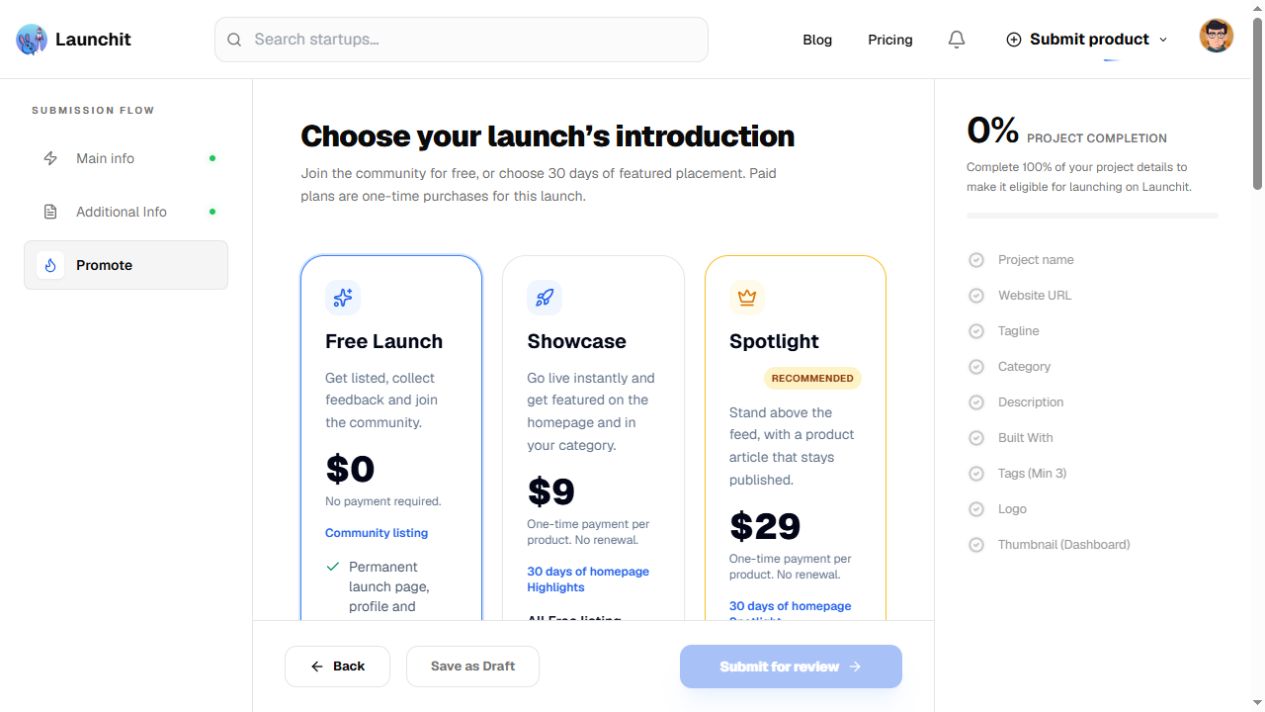
Launch plan
Required- Input
- Choose one option
- Form step
- Promote
- Options
- Free Launch · Showcase · Spotlight
02PLATFORM REQUIREMENTS
Before you submit
- A Google or email account
- Name up to 45 characters, tagline up to 60 and description up to 260 words
- Up to three categories, six actual technologies and three to five tags
- Required logo and thumbnail; optional features and cover images
- Free path: a verified badge and three community upvote tasks
Free $0; Showcase $9 once; Spotlight $29 once. Free requires badge and community tasks; paid plans waive them and include 30-day promotion.
03PUBLISHING WORKFLOW
How to submit
- 01
Sign in and choose Prefer manual? Fill it yourself →. In Main info enter name (≤45 characters), URL, tagline (≤60) and factual description (≤260 words).
- 02
Choose up to three categories and six actual technologies, then add three to five real tags. Upload the required logo and thumbnail; up to five features (≤80 characters each) and two cover images are optional.
- 03
Use Additional Info for optional value proposition, problem solved, target audience, market tags and verified pricing. Save as Draft can preserve progress.
- 04
In Promote choose Free Launch. Save the product name to generate a badge, deploy and verify it, and complete the three required community upvote tasks before Submit for review. Free review is advertised within seven days. Paid plans require an explicit user choice.
04EXPECTED OUTPUT
What gets published
A product launch page with maker details, media, categories, technologies, tags and optional market and pricing information.
Not suitable for
- Products that are not live or cannot be accessed publicly
- Products that clearly fall outside the destination eligibility criteria
The destination controls pricing, moderation and publication. DR is a recorded metric, not a guarantee of traffic or acceptance.
PREPARE. PUBLISH. FOLLOW UP.
Keep the work connected.
Use your website materials to prepare platform-specific content, record your submission and follow the published result.