 Submora
01PREPARATION CHECKLIST
Know the fields before you open the form.
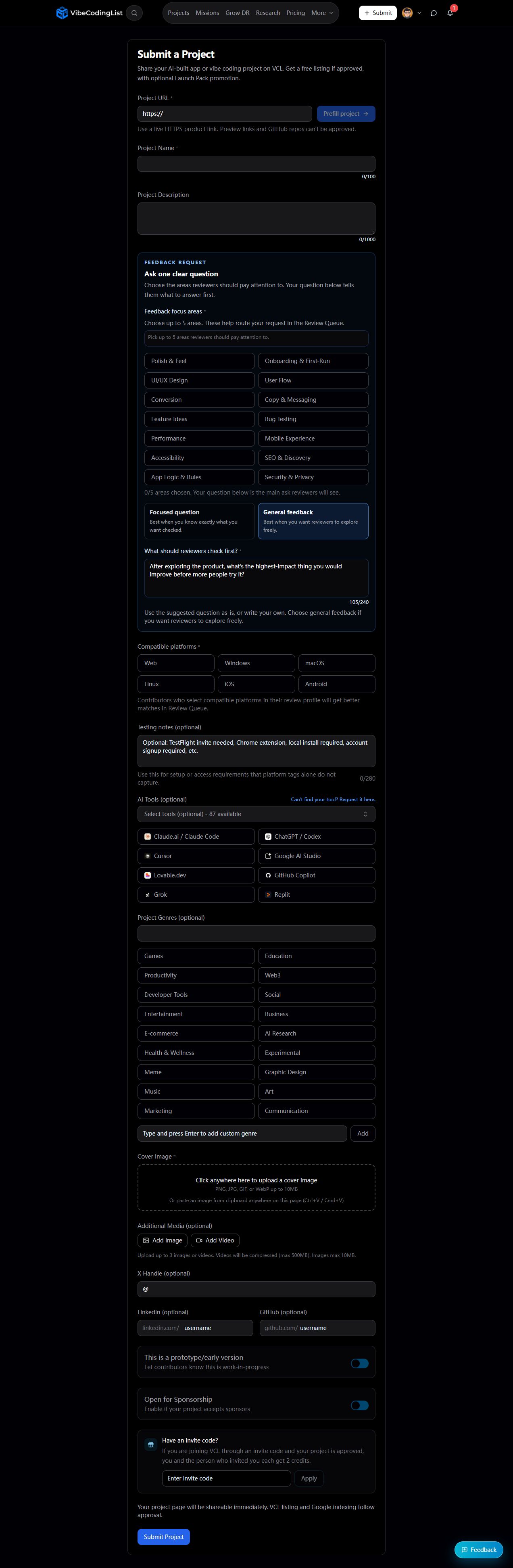
Prepare the information below using the saved platform configuration. Required labels reflect that configuration; confirm the current form before submitting.
01
Project URL
Required- Input
- Website URL
- Form step
- Project submission
- Requirements
- Live HTTPS product URL required; preview URLs and GitHub repositories are ineligible.
02
Project Name
Required- Input
- Short text
- Form step
- Project submission
03
Project Description
Optional- Input
- Long text
- Form step
- Project submission
04
Feedback focus areas
Required- Input
- Choose multiple options
- Form step
- Project submission
- Requirements
- Choose up to five areas for reviewers.
- Options
- Polish & Feel · Onboarding & First-Run · UI/UX Design · User Flow · Conversion · Copy & Messaging · Feature Ideas · Bug Testing · Performance · Mobile Experience · Accessibility · SEO & Discovery · App Logic & Rules · Security & Privacy
05
Feedback mode
Optional- Input
- Choose one option
- Form step
- Project submission
- Requirements
- General feedback populates a suggested question; the question field remains visibly required.
- Options
- Focused question · General feedback
06
What should reviewers check first?
Required- Input
- Long text
- Form step
- Project submission
- Requirements
- One clear review question, maximum 240 characters. General feedback can supply a suggested question.
07
Compatible platforms
Required- Input
- Choose multiple options
- Form step
- Project submission
- Options
- Web · Windows · macOS · Linux · iOS · Android
08
Testing notes
Optional- Input
- Long text
- Form step
- Project submission
- Requirements
- Actual setup or access requirements only.
09
AI Tools
Optional- Input
- Choose multiple options
- Form step
- Project submission
- Options
- Claude.ai / Claude Code · ChatGPT / Codex · Cursor · Google AI Studio · Lovable.dev · GitHub Copilot · Grok · Replit · Bolt (StackBlitz) · Antigravity · WindSurf (Codeium) · v0 by Vercel · Base44 (Wix) · Suno · Cline · ElevenLabs · Amazon Kiro · Firebase Studio · Augment · Google Stitch · Zed · Gemini CLI · Devin (Cognition) · Trae (ByteDance) · OpenAI Playground · wowdev · Midjourney · Anthropic Console · n8n · Rocket.new · Floot · Famous · Framer AI · Blackbox AI · Codev (co.dev) · Zencoder · Kilo Code · Qodo · Tabnine · JetBrains AI · WebSparks · Roo (Cline fork) · Sourcegraph Cody · Avante.nvim · Pythagora · Napkins.dev · Fynix · Tempo Labs · Memex · VibeCode (mobile) · Apidog MCP Server · prompt-tower · Create (create.xyz) · GPT-Engineer · Amazon Q Developer · Continue (OSS) · Creatr · Amp · Chef by Convex · CHAI.new (Langbase) · opcode · Aider · Dyad · RA.Aid · MyCoder.ai · Goose (Block) · CodeSelect · Rork · Fine (fine.dev) · GoCodeo · HeyBoss · bolt.diy (OSS) · Ready Player Me · Langflow · Pika Labs · Scenario · Builder.io (Visual Copilot) · Kaedim · Uizard · TeleportHQ · Superdesign.dev · Runway ML · Softgen (Kortix) · HeroUI Chat · Capacity · Trickle AI · Nut.new (Replay.io)
10
Project Genres
Optional- Input
- Choose multiple options
- Form step
- Project submission
- Options
- Games · Education · Productivity · Web3 · Developer Tools · Social · Entertainment · Business · E-commerce · AI Research · Health & Wellness · Experimental · Meme · Graphic Design · Music · Art · Marketing · Communication
11
Custom genre
Optional- Input
- Short text
- Form step
- Project submission
- Requirements
- Type and press Enter to add a relevant custom genre.
12
Cover Image
Required- Input
- Image upload
- Form step
- Project submission
- Requirements
- Upload or paste PNG, JPG, GIF or WebP up to 10 MB.
- Image requirements
- Up to 10.0 MB · image/png · image/jpeg · image/gif · image/webp
13
Additional images
Optional- Input
- Image upload
- Form step
- Project submission
- Requirements
- At most three additional media items across images and videos. Each image up to 10 MB.
- Image requirements
- Up to 10.0 MB
14
Additional video upload
Optional- Input
- Short text
- Form step
- Project submission
- Requirements
- Manual file upload using Add Video, not a URL field. Video up to 500 MB is compressed; accepted MP4, WebM, QuickTime and AVI. Shared maximum of three additional media items.
15
X Handle
Optional- Input
- Short text
- Form step
- Project submission
- Requirements
- Handle rather than a full profile URL.
16
LinkedIn username
Optional- Input
- Short text
- Form step
- Project submission
- Requirements
- Username/path after the visible linkedin.com/ prefix. No stable identifier was observed.
17
GitHub username
Optional- Input
- Short text
- Form step
- Project submission
- Requirements
- Username/path after the visible github.com/ prefix. No stable identifier was observed.
18
This is a prototype/early version
Optional- Input
- Checkbox
- Form step
- Project submission
19
Open for Sponsorship
Optional- Input
- Checkbox
- Form step
- Project submission
20
Invite code
Optional- Input
- Short text
- Form step
- Project submission
- Requirements
- Optional referral code; do not invent or apply a code.
02PLATFORM REQUIREMENTS
Before you submit
- Google login and a real live HTTPS AI-built or vibe-coding project
- Required project URL/name (100), feedback focus areas (up to five), review question (240), compatible platforms and cover image
- Optional description (1000), access notes (280), factual build tools, genres and additional media
Free listing if approved. Optional Launch Pack promotion; its price and checkout were not inspected.
03PUBLISHING WORKFLOW
How to submit
- 01
Use the separate header Log in and sign in with Google before preparing the submission. Avoid Login & Submit while merely verifying: it explicitly submits automatically after sign-in.
- 02
Enter the live HTTPS product URL and name within 100 characters. Optional description allows 1000 characters; preview URLs and GitHub repositories cannot be approved.
- 03
Choose up to five feedback focus areas and actual compatible platforms. Enter one review question within 240 characters; General feedback supplies a suggested question. Optional testing notes allow 280 characters.
- 04
Select only AI tools actually used. Add relevant genres or a custom genre; leave unknown optional social usernames, business flags and invite code empty.
- 05
Upload the mandatory cover image (PNG/JPG/GIF/WebP, up to 10 MB). Add at most three additional images or videos; images up to 10 MB, compressed videos up to 500 MB.
- 06
Review before Submit Project. The page states the project page becomes shareable immediately but VCL listing and Google indexing follow approval. Final submission, promotion and payment were not tested.
04EXPECTED OUTPUT
What gets published
A product name, description, website link, and any product media accepted by the destination.
Not suitable for
- Products that are not live or cannot be accessed publicly
- Products that clearly fall outside the destination eligibility criteria
The destination controls pricing, moderation and publication. DR is a recorded metric, not a guarantee of traffic or acceptance.
PREPARE. PUBLISH. FOLLOW UP.
Keep the work connected.
Use your website materials to prepare platform-specific content, record your submission and follow the published result.