 Submora
01PREPARATION CHECKLIST
Know the fields before you open the form.
Prepare the information below using the saved platform configuration. Required labels reflect that configuration; confirm the current form before submitting.
01
Website URL
Required- Input
- Website URL
- Requirements
- Actual BuildHop form field.
02
Product Name
Required- Input
- Short text
- Requirements
- Actual BuildHop form field.
03
Tagline
Required- Input
- Short text
- Requirements
- Actual BuildHop form field.
04
Thumbnail Logo Image
Required- Input
- Image upload
- Requirements
- Actual native uploader resizes to256x256WebP. Select real brandlogo; verify renderedpreview afterprocessing.
- Image requirements
- image/png · image/jpeg · image/webp · image/gif
05
Category
Required- Input
- Choose one option
- Requirements
- Actual BuildHop form field.
- Options
- Developer tools · AI · Productivity · Design · Marketing · Finance · Ecommerce · Education · Health & Wellness · Utilities · Entertainment · Social Media
06
Maker name
Required- Input
- Short text
- Requirements
- Actual BuildHop form field.
02PLATFORM REQUIREMENTS
Before you submit
- Public product landingpage must pass iframepreview check
- Real productname<=80,tagline<=120,logoPNG/JPG/WebP/GIF processedto256square
- Choose one of12actualcategories and real makername<=40
- Optional maker X left blank when only product X is known; submission also sent to VerifiedDR and FreeScan
Actual submission completed without checkout or payment. Optional postapproval promotion uses points and was not selected.
03PUBLISHING WORKFLOW
How to submit
- 01
Sign in with Google. If redirected to the dashboard, use Submit A Launch to open the actual publishing form.
- 02
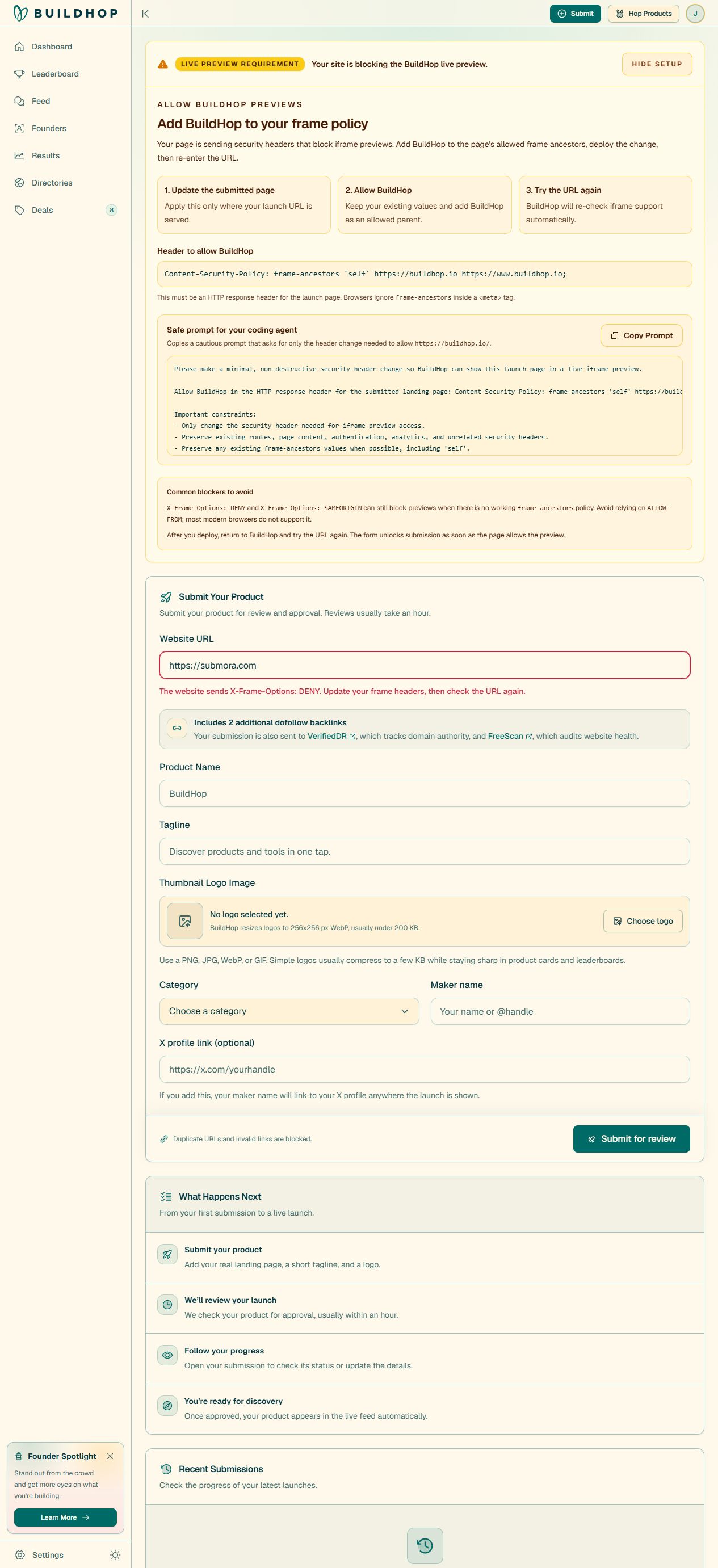
Enter the real landing-page URL and leave the field so BuildHop checks iframe compatibility. Duplicate and invalid URLs are blocked.
- 03
Historical first attempt was blocked by homepage iframe policy. After explicit user authorization, only homepage frame-ancestors was expanded to self, rankinpublic.xyz and buildhop.io; other pages retain DENY. Production headers and actual BuildHop Iframe preview is allowed were verified. No further security change is needed.
- 04
After compatibility is resolved, prepare the actual product name (80), tagline (120), required PNG/JPG/WebP/GIF logo, category and maker name (40). Optional X link connects the maker name to the profile.
- 05
Read back actual name, tagline, Marketing category, maker jianhai huang and true logo processed to256WebP; optional personal X remains blank. Submit for review once returned private item Pending review/LAUNCH SUBMITTED. Free, no terms checkbox or payment; separate point promotions unused. Verify public listing separately. VerifiedDR/FreeScan synchronization is claimed by the page but independently unverified.
04EXPECTED OUTPUT
What gets published
A product name, description, website link, and any product media accepted by the destination.
Not suitable for
- Products that are not live or cannot be accessed publicly
- Products that clearly fall outside the destination eligibility criteria
The destination controls pricing, moderation and publication. DR is a recorded metric, not a guarantee of traffic or acceptance.
PREPARE. PUBLISH. FOLLOW UP.
Keep the work connected.
Use your website materials to prepare platform-specific content, record your submission and follow the published result.