 Submora
01PREPARATION CHECKLIST
Know the fields before you open the form.
Prepare the information below using the saved platform configuration. Required labels reflect that configuration; confirm the current form before submitting.
01
Your website's URL
Required- Input
- Website URL
- Form step
- Website
02
Screenshot
Required- Input
- Image upload
- Form step
- Screenshot
- Requirements
- Up to 1 image(s).
- Image requirements
- Confirm file requirements on the submission form.
03
Website name
Optional- Input
- Short text
- Form step
- Review
- Requirements
- Maximum 28 characters.
04
Headline
Optional- Input
- Short text
- Form step
- Review
- Requirements
- Maximum 140 characters.
05
Long description
Optional- Input
- Long text
- Form step
- Review
- Requirements
- Maximum 600 characters.
06
Category
Optional- Input
- Choose one option
- Form step
- Review
- Options
- A/B Testing · Accounting · Advertising · Affiliate Tracking · Analytics · Android · Apple Watch · Artificial Intelligence · Audio · Augmented Reality · Automation Tools · Blogging · Books · Bots · Branding · Browser Extensions · Building Products · Business Intelligence · Calendar · Careers · Chatbots · Chrome Extensions · Cloud Computing · Cloud Infrastructure · CMS · Collaboration · Communities · Content Creators · Cooking · Crypto · Customer Support · Data Visualization · Databases · Dating · Design · Developer APIs · Developer Tools · Directories · E-Commerce · Education · Email · Entertainment · Feedback Tools · Finance · Fintech · Form Builders · Freelancers · Fundraising · Games · Google Cloud · Health · Hiring · Home Inventory · Image Recognition · Interior Design · Investing · iOS · Journaling · Journalism · Knowledge Management · Launching · Lead Generation · Legal · Mac · Machine Learning · Market Research · Marketing · Marketplaces · Meeting Software · Monetization · Monitoring · Motion Design · Music · News · NFT · No Code · Note Taking · Notion · Online Learning · Open Source · Optimization · Parenting · Payments · Performance Monitoring · Photography · Podcasting · Privacy · Productivity · Productized Services · Project Management · Reading · Recruiting · Reddit · Reduce Costs · Remote Work · Restaurants · SaaS Boilerplates · Sales · Scrapers · Screenshots · Search · Security · SEO · Ship Fast · Social Media · Speech Recognition · Stable Diffusion · Storage · Task Management · Testimonials · To Do Lists · Trading · Translation · Travel · User Experience · Venture Capital · Video · Video Editing · Voice · Web Hosting · Web3 · Website Builders · Writing
07
Your email
Optional- Input
- Email address
- Form step
- Review
08
Opening paragraph
Optional- Input
- Long text
- Form step
- Description
- Requirements
- Maximum 4000 characters. Generated block counts vary by product. Edit the corresponding block manually; do not hard-code the example block index. Emptying a field removes its block.
09
What is the product — paragraph 1
Optional- Input
- Long text
- Form step
- Description
- Requirements
- Maximum 4000 characters. Generated block counts vary by product. Edit the corresponding block manually; do not hard-code the example block index. Emptying a field removes its block.
10
What is the product — paragraph 2
Optional- Input
- Long text
- Form step
- Description
- Requirements
- Maximum 4000 characters. Generated block counts vary by product. Edit the corresponding block manually; do not hard-code the example block index. Emptying a field removes its block.
11
Key feature 1 label
Optional- Input
- Short text
- Form step
- Description
- Requirements
- Maximum 60 characters. Generated block counts vary by product. Edit the corresponding block manually; do not hard-code the example block index. Emptying a field removes its block.
12
Key feature 1 description
Optional- Input
- Short text
- Form step
- Description
- Requirements
- Maximum 500 characters. Generated block counts vary by product. Edit the corresponding block manually; do not hard-code the example block index. Emptying a field removes its block.
13
Key feature 2 label
Optional- Input
- Short text
- Form step
- Description
- Requirements
- Maximum 60 characters. Generated block counts vary by product. Edit the corresponding block manually; do not hard-code the example block index. Emptying a field removes its block.
14
Key feature 2 description
Optional- Input
- Short text
- Form step
- Description
- Requirements
- Maximum 500 characters. Generated block counts vary by product. Edit the corresponding block manually; do not hard-code the example block index. Emptying a field removes its block.
15
Key feature 3 label
Optional- Input
- Short text
- Form step
- Description
- Requirements
- Maximum 60 characters. Generated block counts vary by product. Edit the corresponding block manually; do not hard-code the example block index. Emptying a field removes its block.
16
Key feature 3 description
Optional- Input
- Short text
- Form step
- Description
- Requirements
- Maximum 500 characters. Generated block counts vary by product. Edit the corresponding block manually; do not hard-code the example block index. Emptying a field removes its block.
17
Key feature 4 label
Optional- Input
- Short text
- Form step
- Description
- Requirements
- Maximum 60 characters. Generated block counts vary by product. Edit the corresponding block manually; do not hard-code the example block index. Emptying a field removes its block.
18
Key feature 4 description
Optional- Input
- Short text
- Form step
- Description
- Requirements
- Maximum 500 characters. Generated block counts vary by product. Edit the corresponding block manually; do not hard-code the example block index. Emptying a field removes its block.
19
Key feature 5 label
Optional- Input
- Short text
- Form step
- Description
- Requirements
- Maximum 60 characters. Generated block counts vary by product. Edit the corresponding block manually; do not hard-code the example block index. Emptying a field removes its block.
20
Key feature 5 description
Optional- Input
- Short text
- Form step
- Description
- Requirements
- Maximum 500 characters. Generated block counts vary by product. Edit the corresponding block manually; do not hard-code the example block index. Emptying a field removes its block.
21
Key feature 6 label
Optional- Input
- Short text
- Form step
- Description
- Requirements
- Maximum 60 characters. Generated block counts vary by product. Edit the corresponding block manually; do not hard-code the example block index. Emptying a field removes its block.
22
Key feature 6 description
Optional- Input
- Short text
- Form step
- Description
- Requirements
- Maximum 500 characters. Generated block counts vary by product. Edit the corresponding block manually; do not hard-code the example block index. Emptying a field removes its block.
23
Key feature 7 label
Optional- Input
- Short text
- Form step
- Description
- Requirements
- Maximum 60 characters. Generated block counts vary by product. Edit the corresponding block manually; do not hard-code the example block index. Emptying a field removes its block.
24
Key feature 7 description
Optional- Input
- Short text
- Form step
- Description
- Requirements
- Maximum 500 characters. Generated block counts vary by product. Edit the corresponding block manually; do not hard-code the example block index. Emptying a field removes its block.
25
Pricing paragraph
Optional- Input
- Long text
- Form step
- Description
- Requirements
- Maximum 4000 characters. Generated block counts vary by product. Edit the corresponding block manually; do not hard-code the example block index. Emptying a field removes its block.
26
FAQ 1 question
Optional- Input
- Short text
- Form step
- Description
- Requirements
- Maximum 300 characters. Generated block counts vary by product. Edit the corresponding block manually; do not hard-code the example block index. Emptying a field removes its block.
27
FAQ 1 answer
Optional- Input
- Long text
- Form step
- Description
- Requirements
- Maximum 4000 characters. Generated block counts vary by product. Edit the corresponding block manually; do not hard-code the example block index. Emptying a field removes its block.
28
FAQ 2 question
Optional- Input
- Short text
- Form step
- Description
- Requirements
- Maximum 300 characters. Generated block counts vary by product. Edit the corresponding block manually; do not hard-code the example block index. Emptying a field removes its block.
29
FAQ 2 answer
Optional- Input
- Long text
- Form step
- Description
- Requirements
- Maximum 4000 characters. Generated block counts vary by product. Edit the corresponding block manually; do not hard-code the example block index. Emptying a field removes its block.
30
FAQ 3 question
Optional- Input
- Short text
- Form step
- Description
- Requirements
- Maximum 300 characters. Generated block counts vary by product. Edit the corresponding block manually; do not hard-code the example block index. Emptying a field removes its block.
31
FAQ 3 answer
Optional- Input
- Long text
- Form step
- Description
- Requirements
- Maximum 4000 characters. Generated block counts vary by product. Edit the corresponding block manually; do not hard-code the example block index. Emptying a field removes its block.
02PLATFORM REQUIREMENTS
Before you submit
- A public website URL and screenshot
- Name up to 28 characters, headline up to 140, optional description up to 600
- Category and confirmed email
- Review all generated product, feature, pricing and FAQ copy
- A user-approved $29 payment
The observed submission option costs $29 and advertises a permanent dofollow link without a reciprocal backlink.
03PUBLISHING WORKFLOW
How to submit
- 01
Open Submit your Website. The observed option costs $29. Choose Start Submission, enter the actual URL and Continue.
- 02
Inspect the automatic screenshot once loaded. Retake or Upload my own image can replace it; choose Looks good — Continue →.
- 03
Check Review: website URL, name (≤28 characters), headline (≤140), optional short description (≤600), category and confirmed email. Continue to payment opens Description first.
- 04
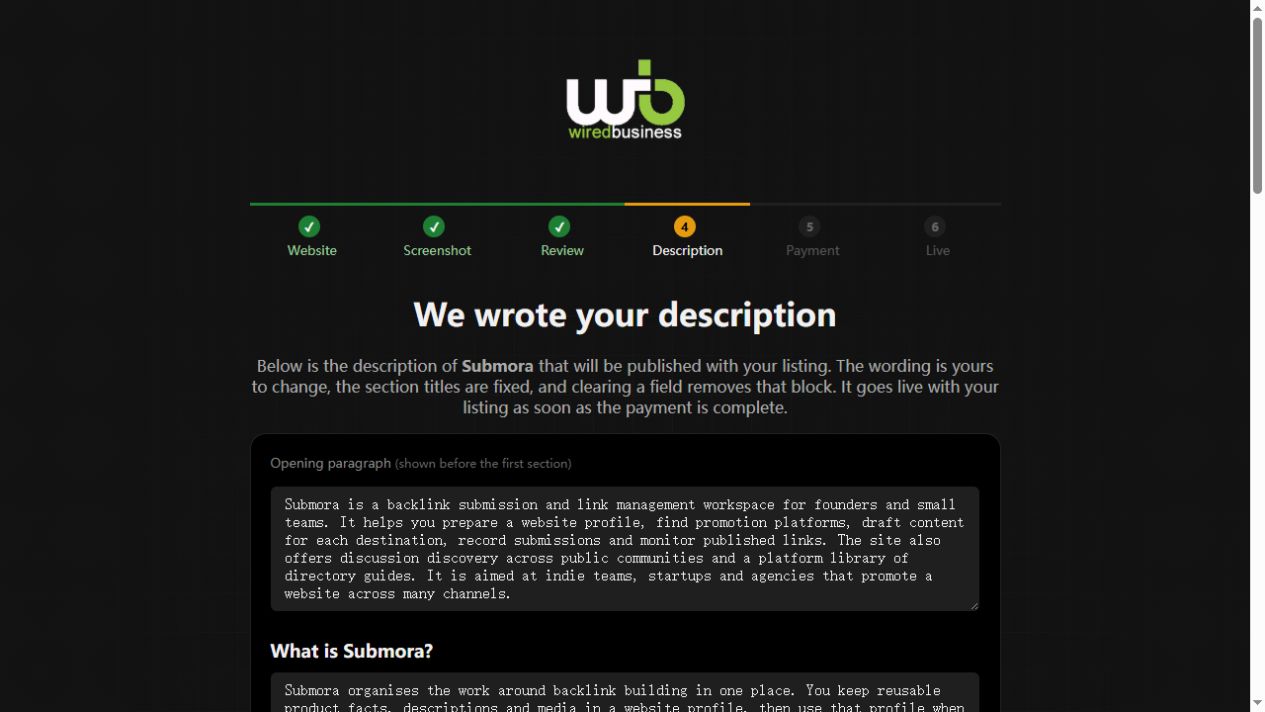
Inspect the generated Description: opening, product explanation, feature labels and descriptions, actual pricing and FAQs. Emptying a field removes its block; section headings and screenshots remain. Save & continue to payment saves edits; Skip to payment retains the generated copy.
- 05
The user must review and complete payment. The listing and description go live after payment completes. No payment or final publication was performed during verification.
04EXPECTED OUTPUT
What gets published
A website listing with name, link, screenshot, headline, category and detailed product explanation, features, pricing, FAQs and two additional screenshots.
Not suitable for
- Products that are not live or cannot be accessed publicly
- Products that clearly fall outside the destination eligibility criteria
The destination controls pricing, moderation and publication. DR is a recorded metric, not a guarantee of traffic or acceptance.
PREPARE. PUBLISH. FOLLOW UP.
Keep the work connected.
Use your website materials to prepare platform-specific content, record your submission and follow the published result.