 Submora
01PREPARATION CHECKLIST
Know the fields before you open the form.
Prepare the information below using the saved platform configuration. Required labels reflect that configuration; confirm the current form before submitting.
01
Website
Required- Input
- Website URL
- Form step
- Step 1
02
Website name
Required- Input
- Short text
- Form step
- Step 1
03
Categories
Required- Input
- Choose multiple options
- Form step
- Step 1
- Requirements
- Select at most three categories.
- Options
- AI · Marketing · SEO · Sales · Analytics · Development · Design · Productivity · Automation · SaaS · Tools · E-commerce · Finance · Education · Security · Customer Support · Communication · Content · Media · Infrastructure · Data · Recruiting · HR · Legal · Real Estate · Healthcare · Travel · Gaming · Communities · Directories · Agencies · Consultancy
04
X handle
Optional- Input
- Short text
- Form step
- Step 1
- Requirements
- Optional real username without @ or the full X URL.
02PLATFORM REQUIREMENTS
Before you submit
No specific requirements have been recorded. Review the destination’s current instructions before preparing your submission.
A free submission path is available; paid acceleration or upgrades are optional.
03PUBLISHING WORKFLOW
How to submit
- 01
Sign in with Google and open Websites in the dashboard.
- 02
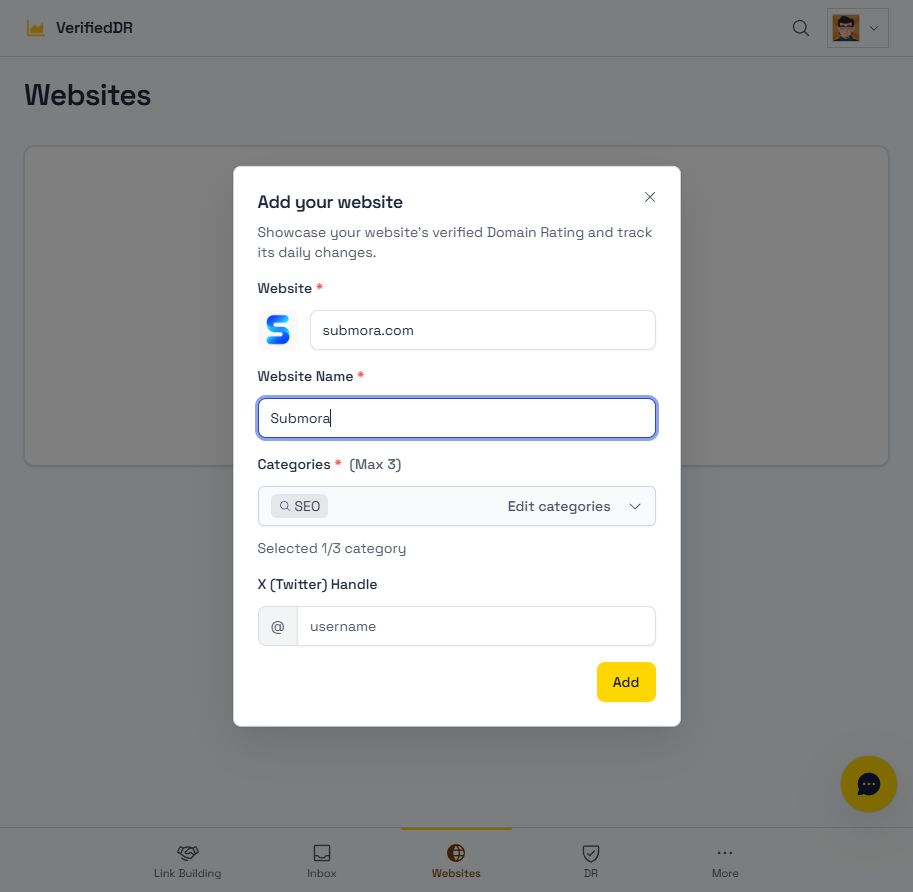
Open Add Website. Enter the actual domain, name (up to 40 characters) and up to three relevant categories; X handle is optional.
- 03
Review before Add. The result after this action and any later ownership or publication steps were not tested. Confirm these conditions before treating the listing as published.
04EXPECTED OUTPUT
What gets published
A product name, description, website link, and any product media accepted by the destination.
Not suitable for
- Products that are not live or cannot be accessed publicly
- Products that clearly fall outside the destination eligibility criteria
The destination controls pricing, moderation and publication. DR is a recorded metric, not a guarantee of traffic or acceptance.
PREPARE. PUBLISH. FOLLOW UP.
Keep the work connected.
Use your website materials to prepare platform-specific content, record your submission and follow the published result.