 Submora
01PREPARATION CHECKLIST
Know the fields before you open the form.
Prepare the information below using the saved platform configuration. Required labels reflect that configuration; confirm the current form before submitting.
01
First name
Required- Input
- Short text
- Form step
- Profile
- Requirements
- Use the account holder real first name. Google supplied jianhai; native maximum sixty characters.
02
Last name
Required- Input
- Short text
- Form step
- Profile
- Requirements
- Use the account holder real last name. Google supplied huang; native maximum sixty characters.
03
Username
Required- Input
- Short text
- Form step
- Profile
- Requirements
- Choose the user authorized public username. jianhaih33 was available and the created profile URL confirmed it. Do not infer a native character cap.
04
Brief bio
Required- Input
- Long text
- Form step
- Profile
- Requirements
- Visible 120-character limit. A factual English bio about working on Submora was accepted.
05
Profile photo
Optional- Input
- Image upload
- Form step
- Profile
- Requirements
- Optional personal photo. Company logo must not replace the account holder photo. Upload limits and backend acceptance were not tested.
- Image requirements
- Confirm file requirements on the submission form.
06
Autofill project URL
Optional- Input
- Website URL
- Form step
- Project
- Requirements
- Optional AI metadata helper with https:// placeholder. Its own input is natively required only when using Autofill. It was not used; review generated metadata if used.
07
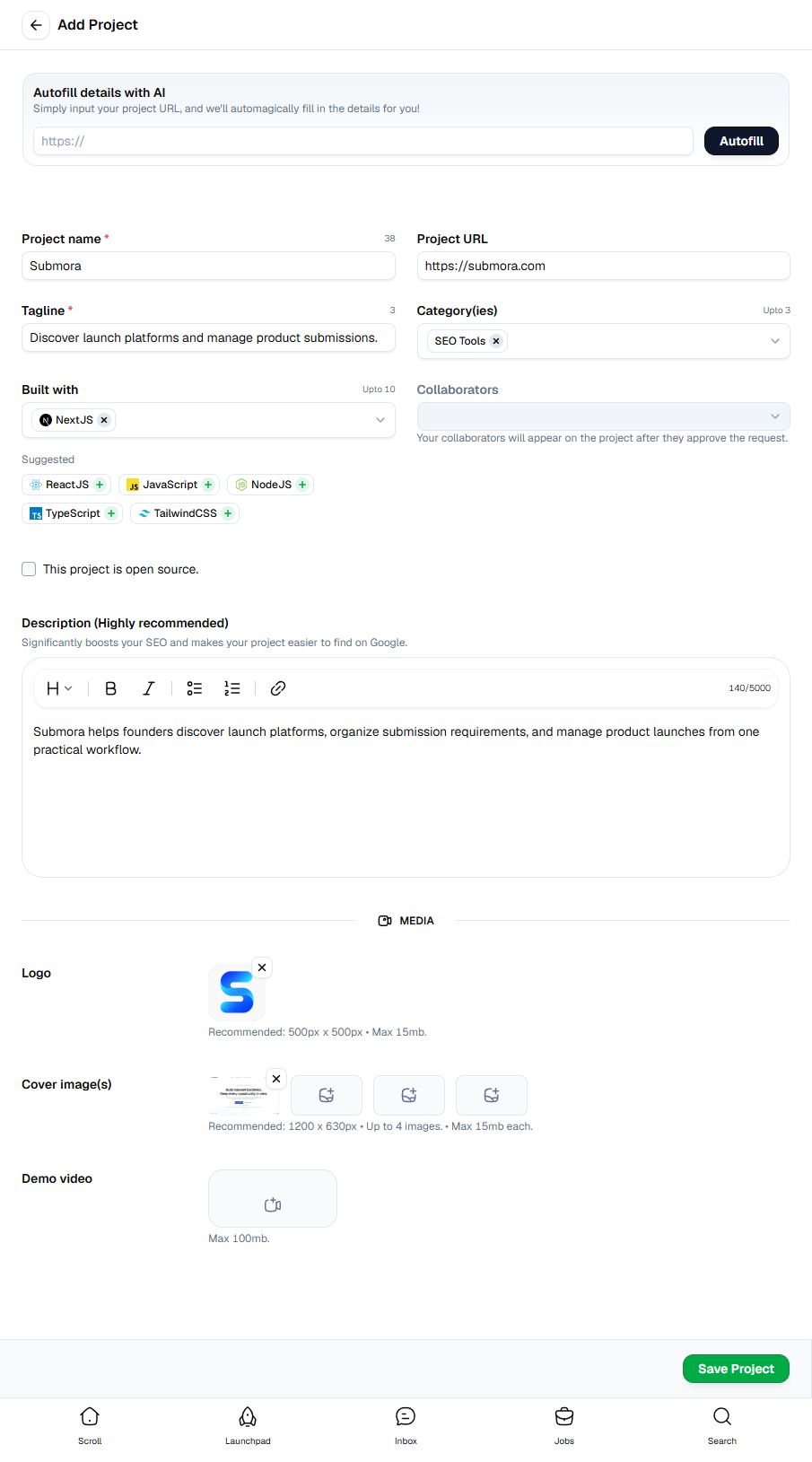
Project name
Required- Input
- Short text
- Form step
- Project
- Requirements
- Native required and maximum forty-five characters. Submora accepted.
08
Project URL
Required- Input
- Website URL
- Form step
- Project
- Requirements
- Native URL input, not natively required, but needed in the Launchpad completion checklist. Actual public https://submora.com accepted.
09
Tagline
Required- Input
- Short text
- Form step
- Project
- Requirements
- Native required and maximum sixty characters. Actual factual English tagline accepted.
10
Category(ies)
Required- Input
- Choose multiple options
- Form step
- Project
- Requirements
- Up to three actual categories. Required by the Launchpad completion checklist; SEO Tools was selected.
- Options
- AI · Advertising · Analytics Tool · Blogging · Bookmarking · Branding · Blockchain · Chrome Extension · Crypto · DevTool · Design Resources · Ecommerce · Email Marketing · Email · Finance · Figma Plugin · Figma Template · Framer Template · Gaming · Hiring · Icon Sets · Internet of Things (IoT) · Link in bio tools · Marketing · Mobile App · Newsletter · News · Notion Template · Productivity · Project Management · Podcast · Portfolio · Programming Language · Resume Builder · SaaS · SEO Analytics tool · SEO Tools · Social Networking · Social Media Management · UI Kit · Video Editing · Web Template · Webflow Template · Website Builder · Web3 · Wireframing · Vibe Coding · YouTube Channel · Entertainment
11
Built with
Required- Input
- Choose multiple options
- Form step
- Project
- Requirements
- Dynamic searchable technology catalog, up to ten selections. Actual existing NextJS option selected. Do not create a new technology or infer the entire catalog from suggestions.
12
Collaborators
Optional- Input
- Choose multiple options
- Form step
- Project
- Requirements
- Collaborators appear only after approving the request. Left empty; no invitations sent.
13
This project is open source.
Optional- Input
- Checkbox
- Form step
- Project
- Requirements
- Unknown repository/license status left unasserted. Any fields exposed by enabling this option remain unseen.
14
Description
Required- Input
- Rich text
- Form step
- Project
- Requirements
- Rich text editor, visible 5000-character counter. Highly recommended and needed for full Launchpad completion. Actual factual English description accepted.
15
Logo
Required- Input
- Image upload
- Form step
- Project
- Requirements
- Launchpad checklist item. Recommended 500 by 500 pixels, maximum 15MB. Native chooser accepts JPG/JPEG/PNG/WebP. Actual public 512-square PNG uploaded successfully.
- Image requirements
- Up to 15.0 MB · image/jpeg · image/png · image/webp
16
Cover image(s)
Required- Input
- Image upload
- Form step
- Project
- Requirements
- Launchpad checklist item. Up to four, maximum 15MB each; 1200 by 630 pixels recommended. Native chooser accepts JPG/JPEG/PNG/GIF/WebP. Actual public homepage PNG uploaded successfully.
- Image requirements
- Up to 15.0 MB · image/jpeg · image/png · image/gif · image/webp
17
Demo video
Optional- Input
- Short text
- Form step
- Project
- Requirements
- Optional file upload, maximum 100MB. Native chooser accepts MP4 and QuickTime/MOV. Schema uses manual text for the video control; no video file uploaded.
02PLATFORM REQUIREMENTS
Before you submit
- Google sign-in and required profile setup
- A real project with all eight Launchpad completion checklist items
- Check the Monday UTC launch window and any later profile/project eligibility requirements
No payment controls in the inspected project editor. Launch fees, upgrades and reciprocal requirements remain unverified after project creation.
03PUBLISHING WORKFLOW
How to submit
- 01
Open Launchpad and sign in with Google. Complete required profile name, available username and a short factual bio; leave optional unknown profile facts empty. Actual profile creation succeeded.
- 02
Open Add Project from the profile. Enter the real project name, homepage URL and concise English tagline. Name native maximum is forty-five, tagline sixty. Optional AI Autofill was not used.
- 03
Choose up to three categories and up to ten actual technologies. SEO Tools and the existing NextJS option were selected. Leave unknown collaborator and open-source facts empty; no invitations were sent.
- 04
Write a factual description within the visible 5000-character counter. Upload the real company logo and public product covers. Logo recommended 500 square, covers 1200 by 630, maximum 15MB each, up to four covers. Actual PNG uploads worked and project completion reached one hundred percent. Optional video is limited to 100MB and was left empty.
- 05
Stop before Save Project. The public Launchpad launch window is Monday 00:00–23:59 UTC, but project publication, later launch controls, fee/review/reciprocal requirements and possible account-profile eligibility enforcement remain unseen. The within-forty-eight-hours planning default does not override those restrictions.
04EXPECTED OUTPUT
What gets published
A product name, description, website link, and any product media accepted by the destination.
Not suitable for
- Products that are not live or cannot be accessed publicly
- Products that clearly fall outside the destination eligibility criteria
The destination controls pricing, moderation and publication. DR is a recorded metric, not a guarantee of traffic or acceptance.
PREPARE. PUBLISH. FOLLOW UP.
Keep the work connected.
Use your website materials to prepare platform-specific content, record your submission and follow the published result.