 Submora
01PREPARATION CHECKLIST
Know the fields before you open the form.
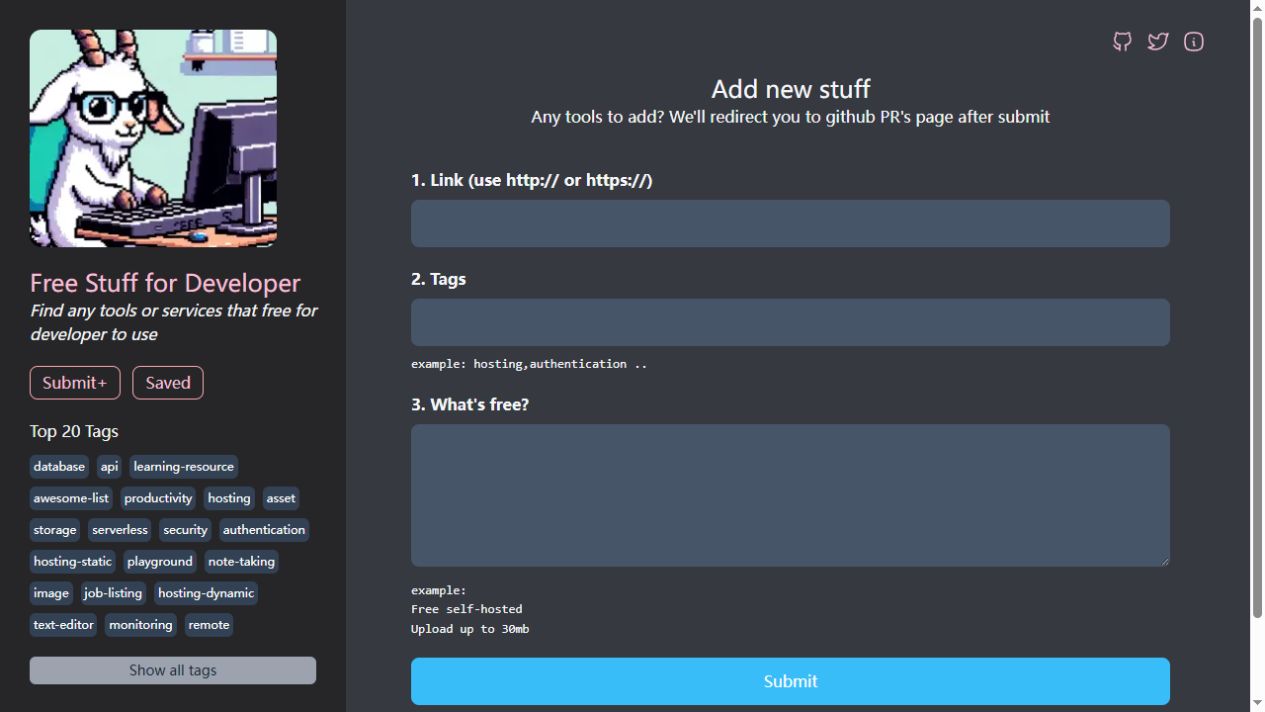
Prepare the information below using the saved platform configuration. Required labels reflect that configuration; confirm the current form before submitting.
01
Link
Required- Input
- Website URL
- Form step
- Initial contribution
02
Tags
Required- Input
- Short text
- Form step
- Initial contribution
- Requirements
- Relevant comma-separated tags, as shown by the hosting,authentication example.
03
What is free?
Optional- Input
- Long text
- Form step
- Initial contribution
- Requirements
- Actual free features and limits only; leave unknown facts empty.
02PLATFORM REQUIREMENTS
Before you submit
- A real publicly accessible developer tool or service with a genuinely free offering
- Required URL and comma-separated tags
- The page announces a GitHub pull-request contribution flow after Submit; that later stage was not verified
No submission fee is shown in the initial form. Later contribution requirements were not inspected.
03PUBLISHING WORKFLOW
How to submit
- 01
Open Add new stuff. The initial form is publicly accessible without login.
- 02
Enter the real HTTP/HTTPS product link and relevant comma-separated tags. Both fields have native required attributes.
- 03
Optionally explain exactly what is free, using current verified plan limits. Do not claim unlimited use or free features that are not available.
- 04
The page says Submit redirects to a GitHub PR page. Inspect the contribution and review requirements there before creating a contribution. Submit, GitHub authentication, commits and pull requests were not performed during this verification.
04EXPECTED OUTPUT
What gets published
A product name, description, website link, and any product media accepted by the destination.
Not suitable for
- Products that are not live or cannot be accessed publicly
- Products that clearly fall outside the destination eligibility criteria
The destination controls pricing, moderation and publication. DR is a recorded metric, not a guarantee of traffic or acceptance.
PREPARE. PUBLISH. FOLLOW UP.
Keep the work connected.
Use your website materials to prepare platform-specific content, record your submission and follow the published result.