 Submora
Know the fields before you open the form.
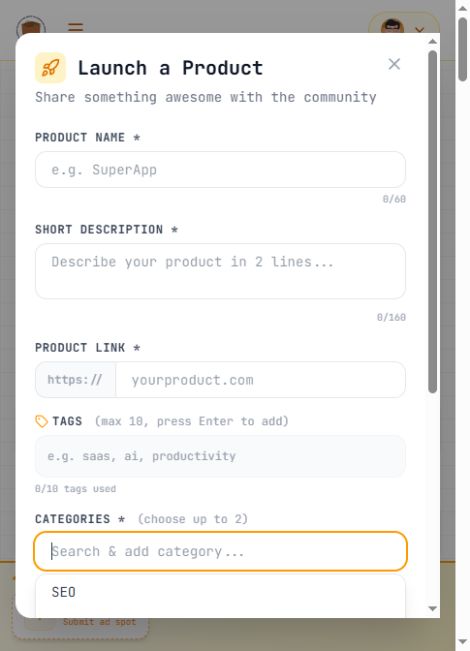
Prepare the information below using the saved platform configuration. Required labels reflect that configuration; confirm the current form before submitting.
Product Name
Required- Input
- Short text
- Form step
- Launch a Product
- Requirements
- Required real product name; maximum 60 characters.
Short Description
Required- Input
- Long text
- Form step
- Launch a Product
- Requirements
- Required concise product description; maximum 160 characters.
Product Link
Required- Input
- Website URL
- Form step
- Launch a Product
- Requirements
- Required real product website. The page supplies https:// separately: omit the protocol in the input, preserving any intended path and query string.
Tags
Optional- Input
- Choose multiple options
- Form step
- Launch a Product
- Requirements
- Up to ten distinct relevant tags; add each with Enter.
Categories
Required- Input
- Choose multiple options
- Form step
- Launch a Product
- Requirements
- Choose up to two relevant categories by clicking each option.
- Options
- SEO · AI Agent · Leads · Editor · Marketing · Productivity · SaaS · Developer Tools · Analytics · Design · Writing · Social Media · E-commerce · Customer Support · Finance · HR & Recruiting · Sales · Education · Security · Database · API & Integration · No-Code
Open to Backlink Barter (Exchange link placements)
Optional- Input
- Checkbox
- Form step
- Launch a Product
- Requirements
- Optional owner preference for exchanging link placements. Leave unchecked unless the owner explicitly chooses it.
Open to Paid Backlinks (Receive paid link placement)
Optional- Input
- Checkbox
- Form step
- Launch a Product
- Requirements
- Optional owner preference for receiving paid link placements; this is not a listing fee. Leave unchecked unless explicitly chosen.
Emoji
Optional- Input
- Choose one option
- Form step
- Launch a Product
- Requirements
- Optional decorative emoji chosen through a button grid. The visible default is a rocket. Confirm the chosen emoji manually; no image-upload field appears in this launch modal.
- Options
- 🚀 · 💡 · 🔥 · ✨ · 🎯 · 💎 · ⚡ · 🌟 · 🎨 · 🛠️ · 📱 · 💻 · 🌐 · 🤖 · 🧠 · 📊 · 🎮 · 🎵 · 📸 · 🎬 · 📝 · 💬 · 🔔 · 🏆 · ❤️ · 🌈 · 🍕 · ☕ · 🧩 · 🔐 · 📦 · 🎁 · 🐱 · 🐶 · 🦄 · 🐙 · 🌱 · 🍀 · 🌻 · 🌊 · 🏠 · 🚗 · ✈️ · 🎈 · 🧪 · 🔬 · 📚 · 🎓 · 🧋 · 🐾 · 🥡 · 🥨 · 🥞 · 🍫 · 🍓
Before you submit
- Authenticated account and a legitimate digital product
- Required product name, short description, product website and up to two relevant categories
Verified basic submission was free and required no backlink. Paid promotion is optional and was not purchased. Previously observed ad prices conflict ($9 on Pricing versus $2 on How it works); verify checkout before buying.
How to submit
- 01
Sign in with the authorized Google account, then open + Launch to display Launch a Product.
- 02
Review product name, short description and the protocol-free product URL. Tags use Enter; categories use clickable options with a two-category limit. Leave backlink preferences unchecked unless chosen by the owner, and confirm the decorative emoji manually.
- 03
After verifying seven automatically filled fields, manually confirm the default rocket emoji. Click Launch once. Open Dashboard > My Products > View Product and verify the public page. Basic submission was free and immediately accessible in this test.

What gets published
A public product page with name, short description, website link, automatically fetched icon, submitter and launch date.
Not suitable for
- Products that are not live or cannot be accessed publicly
- Products that clearly fall outside the destination eligibility criteria
The destination controls pricing, moderation and publication. DR is a recorded metric, not a guarantee of traffic or acceptance.
PREPARE. PUBLISH. FOLLOW UP.
Keep the work connected.
Use your website materials to prepare platform-specific content, record your submission and follow the published result.