 Submora
01PREPARATION CHECKLIST
Know the fields before you open the form.
Prepare the information below using the saved platform configuration. Required labels reflect that configuration; confirm the current form before submitting.
01
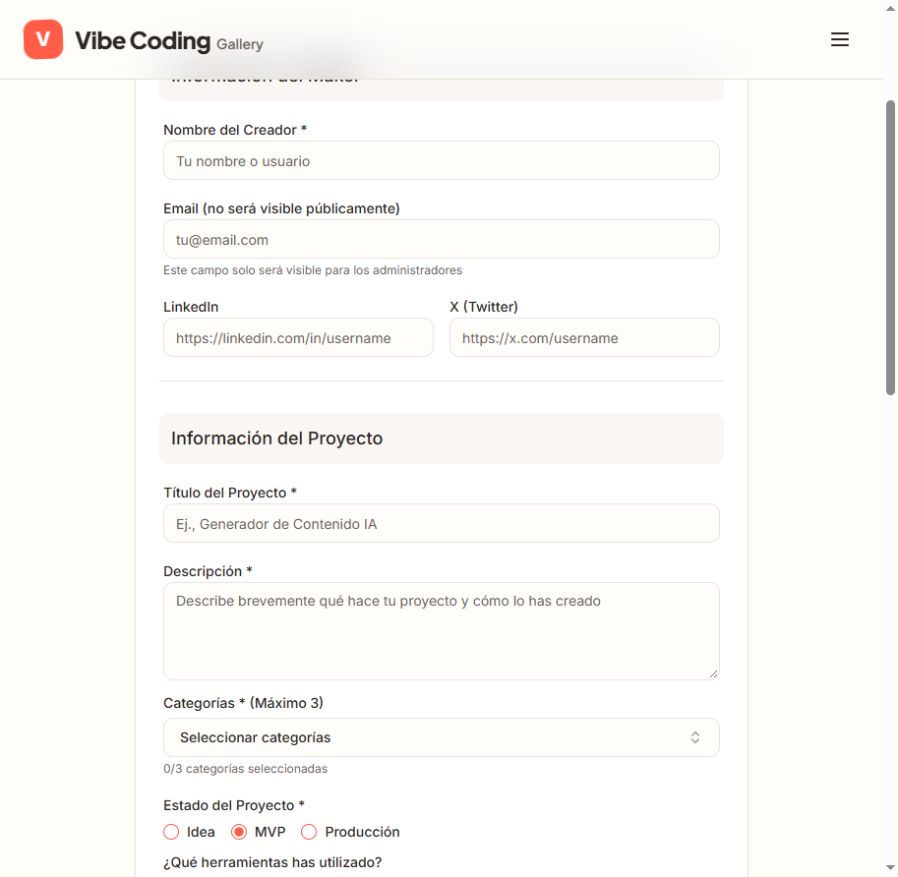
Creator name
Required- Input
- Short text
- Form step
- Maker
02Email
Optional
- Input
- Email address
- Form step
- Maker
- Requirements
- Optional. The destination states that only administrators can see this email.
03LinkedIn
Optional
- Input
- Website URL
- Form step
- Maker
04
X
Optional- Input
- Website URL
- Form step
- Maker
05
Project title
Required- Input
- Short text
- Form step
- Project
06
Description
Required- Input
- Long text
- Form step
- Project
- Requirements
- Describe actual capabilities and how the project was created. Do not invent the creation process.
07
Categories
Required- Input
- Choose multiple options
- Form step
- Project
- Requirements
- Up to three. Options retain actual destination labels, which remain Spanish even on the English page.
- Options
- Chatbots · Generación de Imágenes · Asistentes de Código · Agentes AI · Automatización · Productividad · Educación · Análisis de Datos · Salud · Finanzas · Entretenimiento · Otros
08
Project status
Required- Input
- Choose one option
- Form step
- Project
- Requirements
- Actual stage only. Producción means Production; the default MVP is not a verified claim.
- Options
- Idea · MVP · Producción
09
Tools used
Optional- Input
- Choose multiple options
- Form step
- Project
- Requirements
- Only tools actually used to build the project; do not infer the stack.
- Options
- Lovable · Bolt · Cursor · ChatGPT · Claude · Supabase · Windsurf · Replit · v0
10
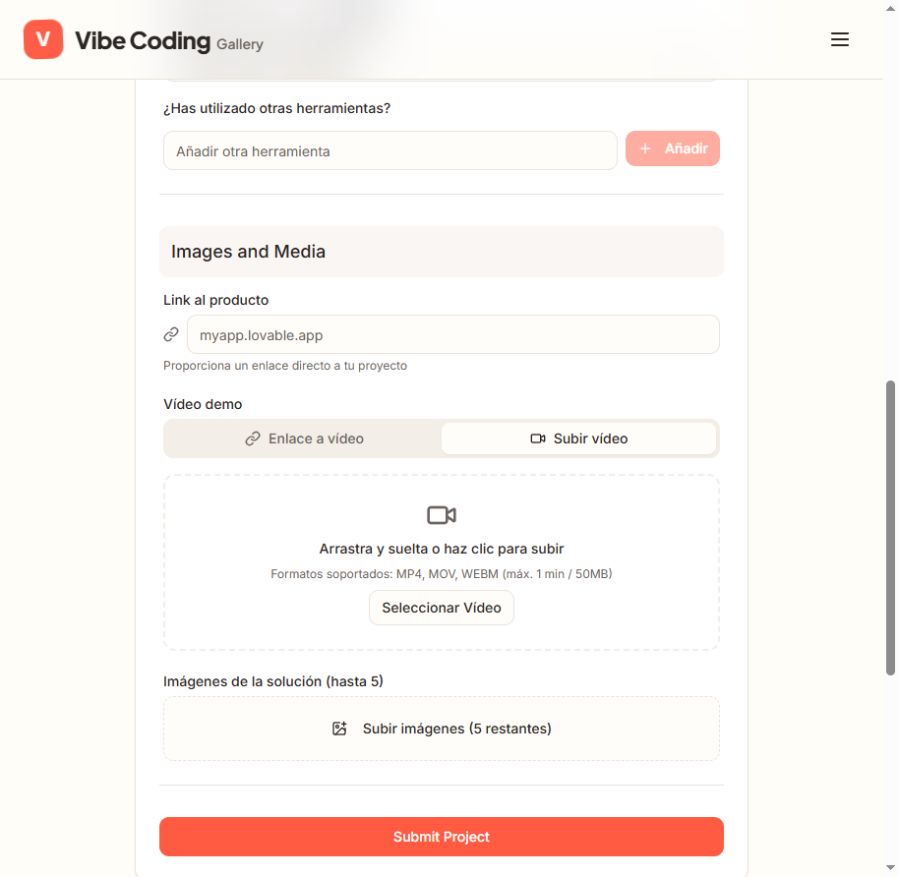
Other tools
Optional- Input
- Short text
- Form step
- Project
- Requirements
- Optional actual custom tool names, added separately with Add.
11
Product link
Optional- Input
- Website URL
- Form step
- Media
12
Demo video (link or upload)
Optional- Input
- Website URL
- Form step
- Media
- Requirements
- Optional. Use the Link tab for an actual YouTube/Loom/other video URL, or manually choose Upload video for MP4/MOV/WebM up to one minute and 50 MB. These are alternative inputs for the same demo.
13
Solution images
Optional- Input
- Image upload
- Form step
- Media
- Requirements
- Optional, up to five actual solution images. Image format, dimensions and size limits were not shown.
- Image requirements
- Confirm file requirements on the submission form.
02PLATFORM REQUIREMENTS
Before you submit
- A factual vibe-coded project and public creator name
- Project title, description, up to three categories and actual stage
- Only actual tools, links and optional media
No fee or paid plan was shown in the inspected public form; final submission was not tested.
03PUBLISHING WORKFLOW
How to submit
- 01
Open the public Submit Project page. No account is needed; some labels remain Spanish even on the English route.
- 02
Enter actual creator name, project title and factual description. Choose up to three categories and actual project stage; optional contact/profile fields must be real.
- 03
Select only actual build tools or add custom names. Optionally add the product URL, a demo link or uploaded video (≤1 minute/50 MB), and up to five real images.
- 04
Review before Submit Project and save the actual result. No publication schedule or deadline is stated; final submission was not tested.
04EXPECTED OUTPUT
What gets published
A project gallery entry with maker and project information, selected tools and optional links/media. Email is visible only to administrators.
Not suitable for
- Products that are not live or cannot be accessed publicly
- Products that clearly fall outside the destination eligibility criteria
The destination controls pricing, moderation and publication. DR is a recorded metric, not a guarantee of traffic or acceptance.
PREPARE. PUBLISH. FOLLOW UP.
Keep the work connected.
Use your website materials to prepare platform-specific content, record your submission and follow the published result.