 Submora
01PREPARATION CHECKLIST
Know the fields before you open the form.
Prepare the information below using the saved platform configuration. Required labels reflect that configuration; confirm the current form before submitting.
01
Product URL
Optional- Input
- Website URL
- Form step
- Website analysis
- Requirements
- Enter the actual public website before Start Analysis.
02
Product name
Optional- Input
- Short text
- Form step
- Product information
03
Short description
Optional- Input
- Short text
- Form step
- Product information
- Requirements
- The placeholder asks for 50 characters. Native input does not enforce a maximum; manually check AI output.
04
Website description
Optional- Input
- Short text
- Form step
- Product information
- Requirements
- Actual website meta description. Required status and maximum length are not shown.
05
Detailed introduction
Optional- Input
- Long text
- Form step
- Product information
- Requirements
- Markdown supported. Review and correct AI-generated capabilities, metrics, examples and comparisons before publication.
06
Official website
Optional- Input
- Website URL
- Form step
- Product information
07
Logo (URL or upload)
Optional- Input
- Image upload
- Form step
- Product information
- Requirements
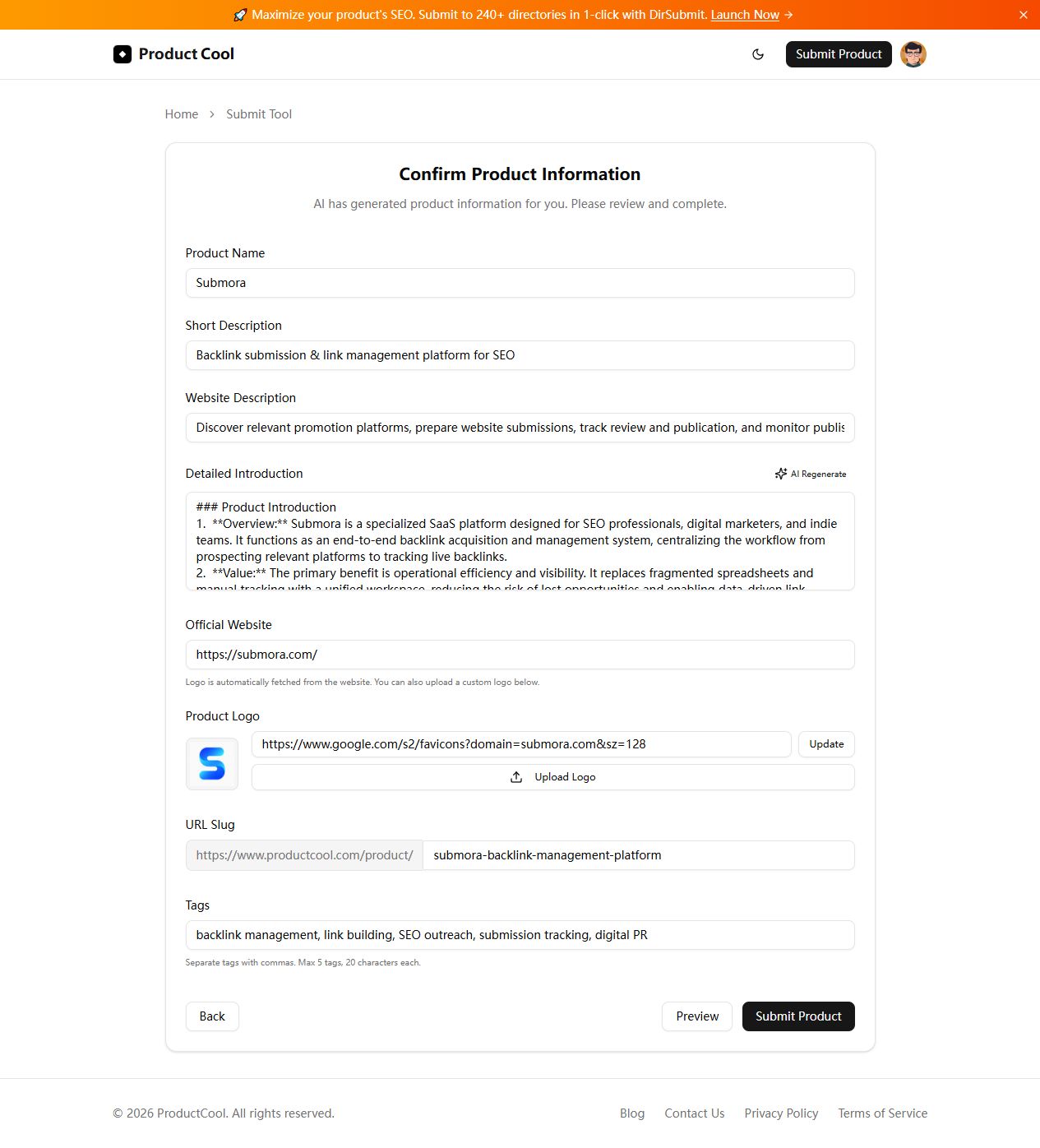
- Automatically fetched logo can be replaced by URL (then Update) or Upload Logo. File input accepts image/*; no size or dimension limit is shown.
- Image requirements
- Confirm file requirements on the submission form.
08
URL slug
Optional- Input
- Short text
- Form step
- Product information
- Requirements
- Confirm the actual productcool.com/product/ path. AI generates a suggestion; uniqueness constraints are not shown.
09
Tags
Optional- Input
- Short text
- Form step
- Product information
- Requirements
- Comma-separated, maximum five tags and twenty characters per tag. No native input maximum is set.
02PLATFORM REQUIREMENTS
Before you submit
- Google or another supported account
- Public product URL for website analysis
- Review generated information, slug, logo and tags before final submission
Submission fees are unverified. No payment was made during verification. Check any later fee or checkout requirements before final submission.
03PUBLISHING WORKFLOW
How to submit
- 01
Sign in with Google and open Submit Product.
- 02
Enter the actual public website and use Start Analysis. Wait for Confirm Product Information.
- 03
Review every generated fact. Correct name, short description (50 characters), website description and Markdown introduction. Confirm website and slug, and update or upload the real logo.
- 04
Use at most five comma-separated tags, each within twenty characters. Open Preview and check the rendered result.
- 05
Submit Product only after review. Final publication behavior, fees and review timing were not tested; record the actual public URL and outcome.
04EXPECTED OUTPUT
What gets published
A product name, description, website link, and any product media accepted by the destination.
Not suitable for
- Products that are not live or cannot be accessed publicly
- Products that clearly fall outside the destination eligibility criteria
The destination controls pricing, moderation and publication. DR is a recorded metric, not a guarantee of traffic or acceptance.
PREPARE. PUBLISH. FOLLOW UP.
Keep the work connected.
Use your website materials to prepare platform-specific content, record your submission and follow the published result.