 Submora
01PREPARATION CHECKLIST
Know the fields before you open the form.
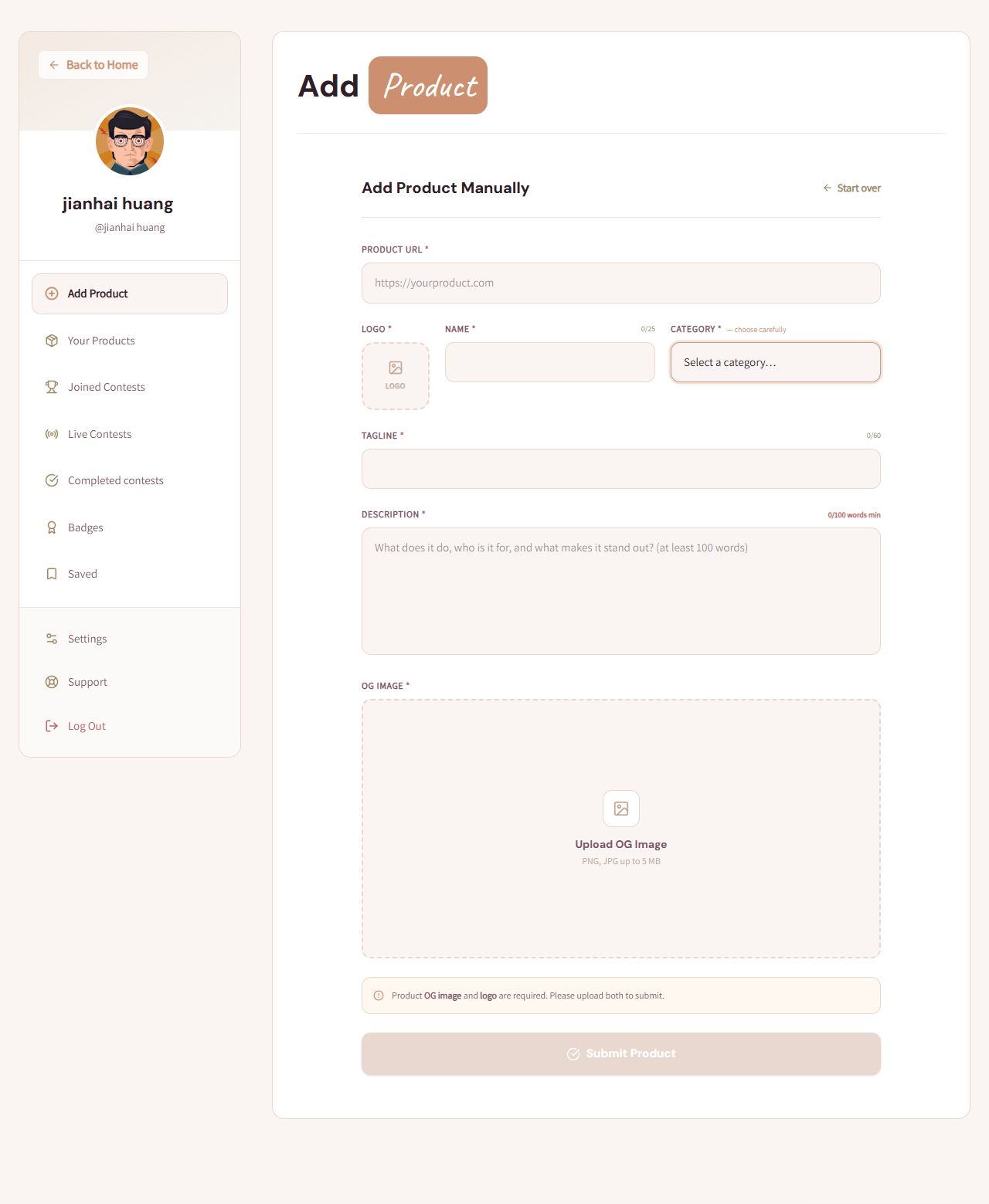
Prepare the information below using the saved platform configuration. Required labels reflect that configuration; confirm the current form before submitting.
01
Product URL
Required- Input
- Website URL
- Form step
- Manual product
02
Logo
Required- Input
- Image upload
- Form step
- Manual product
- Requirements
- Required. Image input accepts image/*; no logo-specific byte or dimension limit is shown.
- Image requirements
- Confirm file requirements on the submission form.
03
Name
Required- Input
- Short text
- Form step
- Manual product
04
Category
Required- Input
- Choose one option
- Form step
- Manual product
- Requirements
- Required; the page says choose carefully.
- Options
- AI Tools · Analytics · Design · Developer Tools · E-commerce · Education · Finance · Healthcare · Marketing · No-Code or Low-Code Tools · Product Directory · Productivity · SaaS · Social
05
Tagline
Required- Input
- Short text
- Form step
- Manual product
06
Description
Required- Input
- Long text
- Form step
- Manual product
- Requirements
- At least one hundred words, not characters. Describe actual function, audience and differences. No maximum is shown.
07
OG image
Required- Input
- Image upload
- Form step
- Manual product
- Requirements
- Required along with logo. Visible hint: PNG/JPG up to 5 MB. Native input accepts image/*; use the displayed narrower requirement.
- Image requirements
- Up to 5.0 MB · image/png · image/jpeg
02PLATFORM REQUIREMENTS
Before you submit
- Account login
- Actual product URL, required logo, name ≤25 characters and tagline ≤60
- A relevant category, description of at least one hundred words, and required PNG/JPG OG image ≤5 MB
Submission fees are unverified. No payment was made during verification. Check any later fee or checkout requirements before final submission.
03PUBLISHING WORKFLOW
How to submit
- 01
Sign in with Google and choose Add Product in the dashboard.
- 02
Choose Add Manually, or enter the real URL and Fetch Info if using automatic extraction. Review extracted facts before submission.
- 03
Enter the actual URL, name within 25 characters, tagline within 60, relevant category and factual description of at least one hundred words.
- 04
Upload both the real logo and OG image. OG image requires PNG/JPG up to 5 MB; logo size and dimensions are not specified.
- 05
Review before Submit Product. Final publication and any separate contest enrollment were not tested; no deadline or scheduling control was shown. Record the actual result and public URL.
04EXPECTED OUTPUT
What gets published
A product name, description, website link, and any product media accepted by the destination.
Not suitable for
- Products that are not live or cannot be accessed publicly
- Products that clearly fall outside the destination eligibility criteria
The destination controls pricing, moderation and publication. DR is a recorded metric, not a guarantee of traffic or acceptance.
PREPARE. PUBLISH. FOLLOW UP.
Keep the work connected.
Use your website materials to prepare platform-specific content, record your submission and follow the published result.