 Submora
01PREPARATION CHECKLIST
Know the fields before you open the form.
Prepare the information below using the saved platform configuration. Required labels reflect that configuration; confirm the current form before submitting.
01
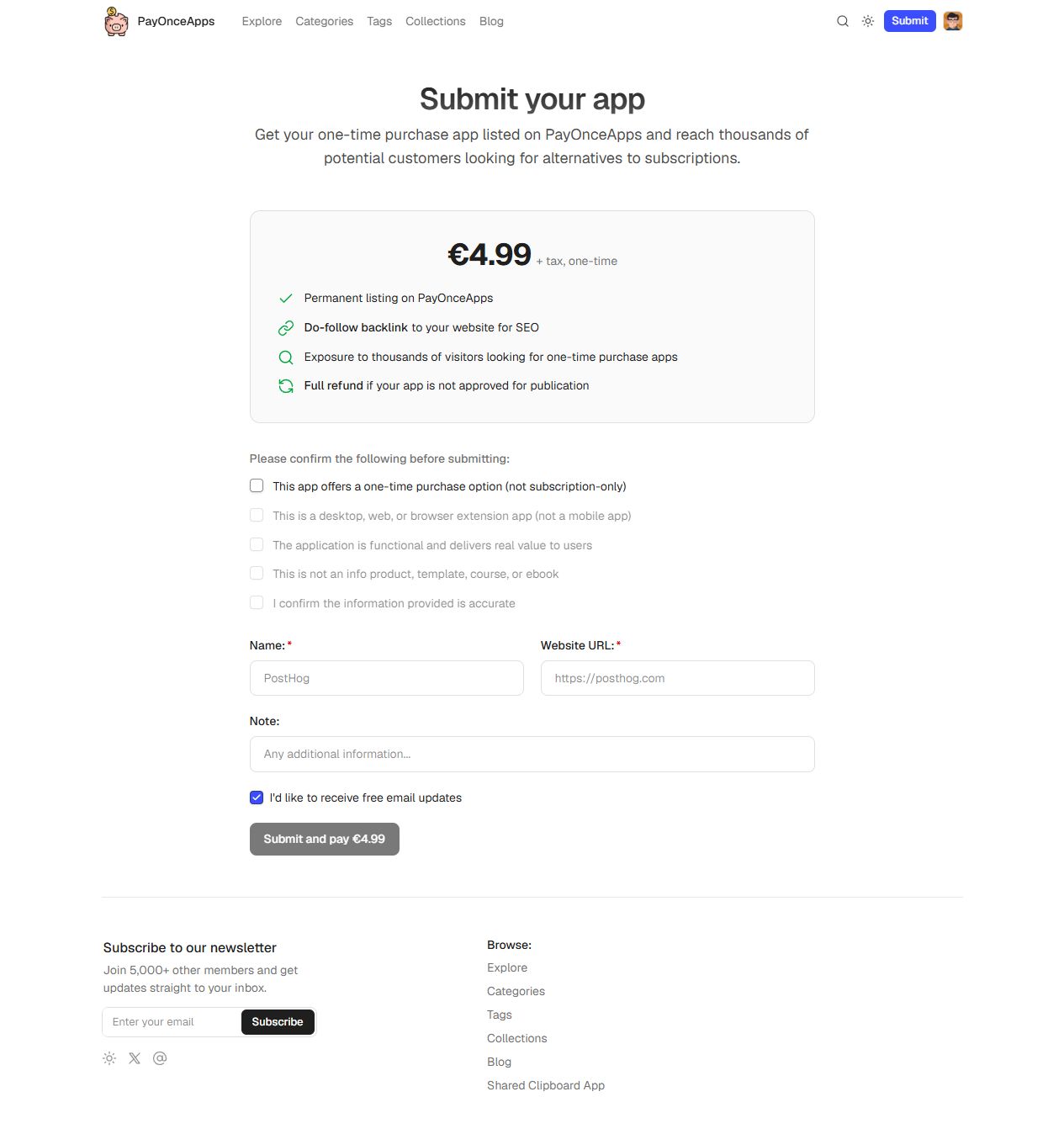
This app offers a one-time purchase option (not subscription-only)
Required- Input
- Checkbox
- Form step
- Submission
- Requirements
- Eligibility declaration, mandatory before payment. Confirm only if factually correct; later declarations unlock sequentially.
02
This is a desktop, web, or browser extension app (not a mobile app)
Required- Input
- Checkbox
- Form step
- Submission
- Requirements
- Eligibility declaration, mandatory before payment. Confirm only if factually correct; later declarations unlock sequentially.
03
The application is functional and delivers real value to users
Required- Input
- Checkbox
- Form step
- Submission
- Requirements
- Eligibility declaration, mandatory before payment. Confirm only if factually correct; later declarations unlock sequentially.
04
This is not an info product, template, course, or ebook
Required- Input
- Checkbox
- Form step
- Submission
- Requirements
- Eligibility declaration, mandatory before payment. Confirm only if factually correct; later declarations unlock sequentially.
05
I confirm the information provided is accurate
Required- Input
- Checkbox
- Form step
- Submission
- Requirements
- Eligibility declaration, mandatory before payment. Confirm only if factually correct; later declarations unlock sequentially.
06
Name
Required- Input
- Short text
- Form step
- Submission
07
Website URL
Required- Input
- Website URL
- Form step
- Submission
08
Note
Optional- Input
- Long text
- Form step
- Submission
- Requirements
- Optional additional factual information.
09
Free email updates
Optional- Input
- Checkbox
- Form step
- Submission
- Requirements
- Optional marketing updates, checked by default. Uncheck if not wanted.
02PLATFORM REQUIREMENTS
Before you submit
- A functional desktop, web or browser-extension app with a one-time purchase option
- Not a mobile app, subscription-only product, template, course, ebook or other info product
- Five factual eligibility declarations plus name and website URL
€4.99 plus tax, once. Full refund if the app is not approved for publication.
03PUBLISHING WORKFLOW
How to submit
- 01
Sign in with Google and open Submit your app. Check the €4.99 plus tax one-time fee and refund condition.
- 02
Confirm eligibility only when true: one-time purchase, desktop/web/extension, functional, not an info product, and accurate information. Checkboxes unlock in order. Stop if any condition does not apply.
- 03
Enter actual app name and website URL. Note is optional; review the default email-update opt-in.
- 04
Review before Submit and pay. Payment was not tested. Approval controls publication; no deadline is stated. Record the approved public URL or refund outcome.
04EXPECTED OUTPUT
What gets published
A product name, description, website link, and any product media accepted by the destination.
Not suitable for
- Products that are not live or cannot be accessed publicly
- Products that clearly fall outside the destination eligibility criteria
The destination controls pricing, moderation and publication. DR is a recorded metric, not a guarantee of traffic or acceptance.
PREPARE. PUBLISH. FOLLOW UP.
Keep the work connected.
Use your website materials to prepare platform-specific content, record your submission and follow the published result.