 Submora
01PREPARATION CHECKLIST
Know the fields before you open the form.
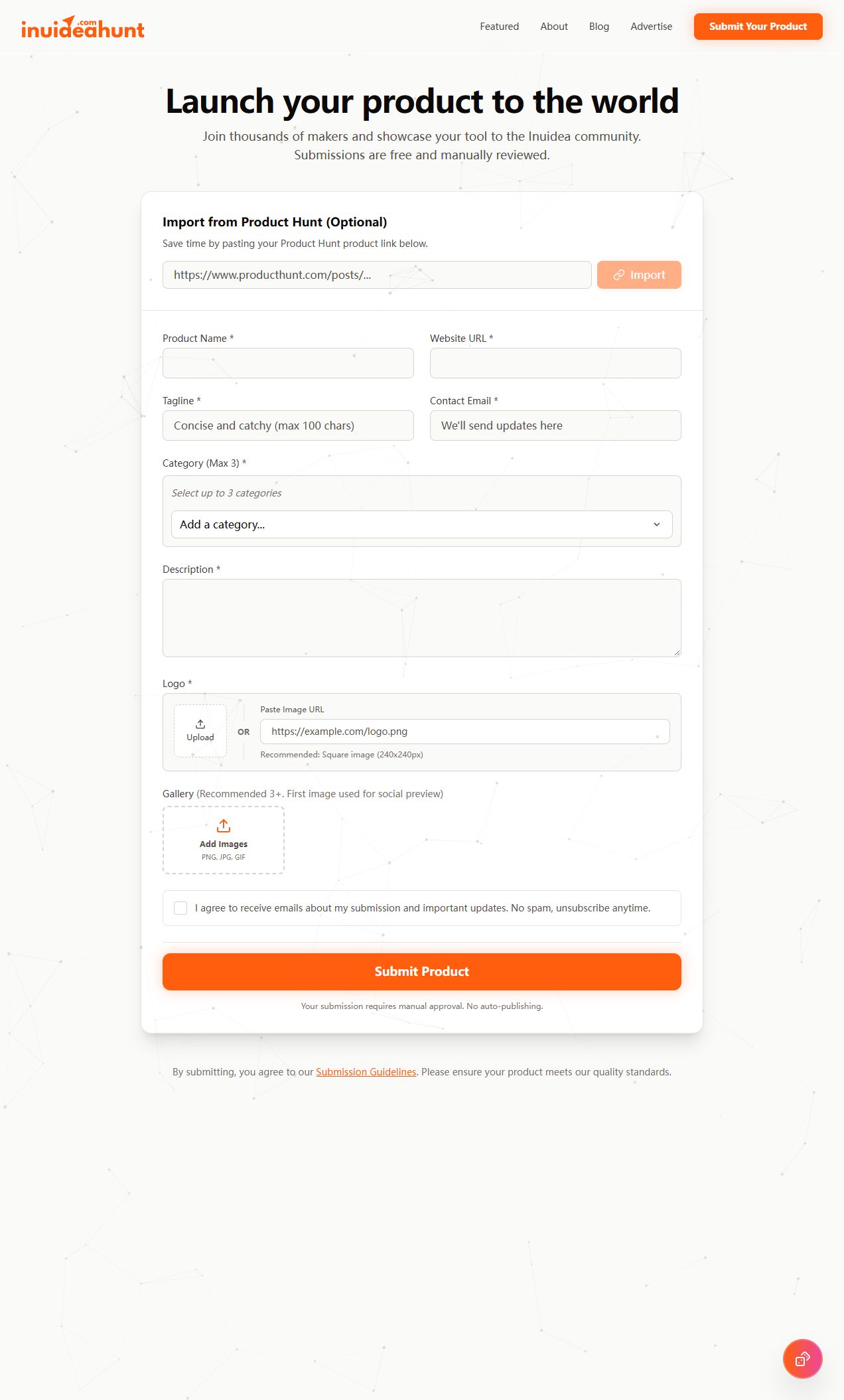
Prepare the information below using the saved platform configuration. Required labels reflect that configuration; confirm the current form before submitting.
01
Product Hunt import URL
Optional- Input
- Website URL
- Form step
- Product details
- Requirements
- Optional import helper; only use an existing product listing you own or represent.
02
Product Name
Required- Input
- Short text
- Form step
- Product details
03
Website URL
Required- Input
- Website URL
- Form step
- Product details
04
Tagline
Required- Input
- Short text
- Form step
- Product details
- Requirements
- Maximum 100 characters.
05
Contact Email
Required- Input
- Email address
- Form step
- Product details
06
Category
Required- Input
- Choose multiple options
- Form step
- Product details
- Requirements
- Add up to three categories using the dropdown.
- Options
- Tool · Product · Business · Agency · SaaS · Blog · Website · Vibe Coding · Productivity · Design · Marketing · Newsletter · Hosting · AI · Other
07
Description
Required- Input
- Long text
- Form step
- Product details
08
Logo upload
Required- Input
- Image upload
- Form step
- Product details
- Requirements
- Logo is mandatory; upload OR paste an image URL. Square 240 × 240 is recommended. No byte limit is stated.
- Image requirements
- Confirm file requirements on the submission form.
09
Logo image URL
Optional- Input
- Website URL
- Form step
- Product details
- Requirements
- Alternative to logo upload; both are not required together.
10
Gallery
Optional- Input
- Image upload
- Form step
- Product details
- Requirements
- Three or more images recommended; the first is used for social preview. Visible formats PNG, JPG, GIF; no byte limit is stated.
- Image requirements
- image/png · image/jpeg · image/gif
11
Submission and update emails consent
Required- Input
- Checkbox
- Form step
- Product details
- Requirements
- Native required checkbox for submission and important-update emails. Review this consent before final submission.
02PLATFORM REQUIREMENTS
Before you submit
- Represent a functional, accessible product with an honest description
- Required name, website URL, tagline up to 100 characters, contact email, categories, description and logo
- Required submission/update email consent; gallery is optional
Product submissions are free. Optional paid featured/sponsored visibility is separate; payment does not change approval standards.
03PUBLISHING WORKFLOW
How to submit
- 01
Read the Submission Guidelines. Only submit a product you own or represent; approval is discretionary and all submissions are reviewed.
- 02
Enter the real name, website URL, tagline up to 100 characters, contact email and factual description. Optional Product Hunt import must use a real existing listing.
- 03
Add up to three relevant categories. Supply a logo by upload or image URL; square 240 × 240 is recommended.
- 04
Optionally add gallery images; three or more are recommended and the first is used for social preview. Review the required email consent before final submission.
- 05
Review before Submit Product. Publication requires manual approval with no stated deadline; final submission was not performed.
04EXPECTED OUTPUT
What gets published
A product name, description, website link, and any product media accepted by the destination.
Not suitable for
- Products that are not live or cannot be accessed publicly
- Products that clearly fall outside the destination eligibility criteria
The destination controls pricing, moderation and publication. DR is a recorded metric, not a guarantee of traffic or acceptance.
PREPARE. PUBLISH. FOLLOW UP.
Keep the work connected.
Use your website materials to prepare platform-specific content, record your submission and follow the published result.