 Submora
01PREPARATION CHECKLIST
Know the fields before you open the form.
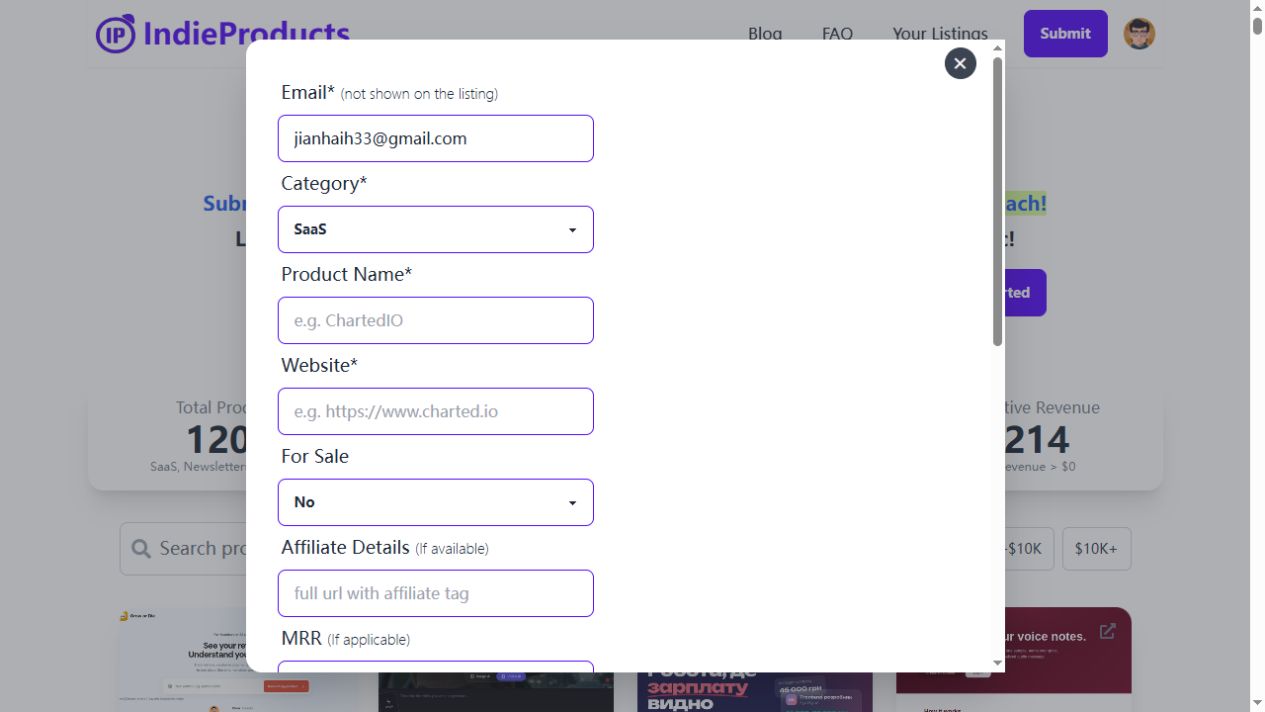
Prepare the information below using the saved platform configuration. Required labels reflect that configuration; confirm the current form before submitting.
01Email
Required
- Input
- Email address
- Form step
- Submission
02
Category
Required- Input
- Choose one option
- Form step
- Submission
- Options
- SaaS · Website · Newsletter · Mobile app · Desktop app · Service/Agency · Browser extension · Others · Ghostwriter
03
Product Name
Required- Input
- Short text
- Form step
- Submission
04
Website
Required- Input
- Website URL
- Form step
- Submission
05
For Sale
Required- Input
- Choose one option
- Form step
- Submission
- Requirements
- Native required=true. The user must confirm actual sale intent; default No is not a verified declaration.
- Options
- No · Yes
06
Affiliate Details (If available)
Optional- Input
- Website URL
- Form step
- Submission
- Requirements
- Optional real affiliate URL; do not substitute the main website URL.
07
MRR (If applicable)
Optional- Input
- Choose one option
- Form step
- Submission
- Requirements
- Optional actual monthly recurring revenue band. Confirm with the user; do not accept the default $0 as a fact.
- Options
- $0 - Just started! · $1 - $1K · $1K - $3K · $3K - $5K · $5 - $10K · $10K+
08
Short Description
Required- Input
- Long text
- Form step
- Submission
09
Detailed Description
Optional- Input
- Long text
- Form step
- Submission
02PLATFORM REQUIREMENTS
Before you submit
- A Google account
- Confirmed email, actual category, product name, website and short description
- User confirmation of For Sale; MRR only from actual business figures
Submit for FREE! (Beta period) is the observed current offer; future free pricing is not promised.
03PUBLISHING WORKFLOW
How to submit
- 01
Sign in with Google and confirm the account menu and Your Listings are visible.
- 02
Click Submit or Get started to open the form. Enter email (not public), actual category, product name and website.
- 03
Write a factual short description; detailed description is optional. For Sale requires user confirmation; only enter real MRR or affiliate details. Do not treat the default $0 as a revenue fact.
- 04
Review before Submit for FREE! (Beta period). Save the receipt and track publication. The official FAQ states that submissions are manually verified before going live, without a stated deadline.
04EXPECTED OUTPUT
What gets published
A product directory entry with product details and optional affiliate, sale and revenue information. The form says contact email is not displayed on the listing.
Not suitable for
- Products that are not live or cannot be accessed publicly
- Products that clearly fall outside the destination eligibility criteria
The destination controls pricing, moderation and publication. DR is a recorded metric, not a guarantee of traffic or acceptance.
PREPARE. PUBLISH. FOLLOW UP.
Keep the work connected.
Use your website materials to prepare platform-specific content, record your submission and follow the published result.