 Submora
01PREPARATION CHECKLIST
Know the fields before you open the form.
Prepare the information below using the saved platform configuration. Required labels reflect that configuration; confirm the current form before submitting.
01
Startup Name
Required- Input
- Short text
- Form step
- Manual — Startup General
02
Status
Required- Input
- Choose one option
- Form step
- Manual — Startup General
- Options
- Building · Launched · Growing · Seeking Funding · Acquired · Sold · Pivoting · On Hold · At Risk · Closed
03
Description
Required- Input
- Long text
- Form step
- Manual — Startup General
- Requirements
- Maximum 80 characters.
04
Logo URL
Optional- Input
- Website URL
- Form step
- Manual — Startup General
05
Logo Upload
Optional- Input
- Image upload
- Form step
- Manual — Startup General
- Requirements
- Up to 1 image(s).
- Image requirements
- Confirm file requirements on the submission form.
06
Categories
Optional- Input
- Choose multiple options
- Form step
- Manual — Startup General
- Options
- AI · SaaS · Web3 · Robotics · Productivity · Technology · Healthcare · Finance · Education · Social · E-commerce · Gaming · Media · Real Estate · Transportation · Travel · Food & Beverage · Hardware · Software · Biotech · Energy · Environment · Blockchain · Cryptocurrency · Cybersecurity · Data Analytics · Design · Fashion · Fintech · Insurtech · IoT · Legaltech · Marketplace · Music · Nanotech · Proptech · Retail · Space · Sports · Telecom · VR/AR · Wellness · Other
07
Website URL
Optional- Input
- Website URL
- Form step
- Manual — Startup General
08
Revenue
Optional- Input
- Short text
- Form step
- Manual — Startup General
- Requirements
- Optional actual revenue. User input and confirmation are required; never infer an amount.
09
What did you ship today?
Optional- Input
- Long text
- Form step
- Projects
02PLATFORM REQUIREMENTS
Before you submit
- A Google account and completed maker profile
- Startup name, actual status and a short description
- Optional real logo, categories, website URL and revenue information
A free account can open the manual startup form. Paid limits and pricing were not verified.
03PUBLISHING WORKFLOW
How to submit
- 01
Sign in with Google. Initial maker setup requires a public name, username and bio; username is limited to 20 letters or digits and bio to 80 characters.
- 02
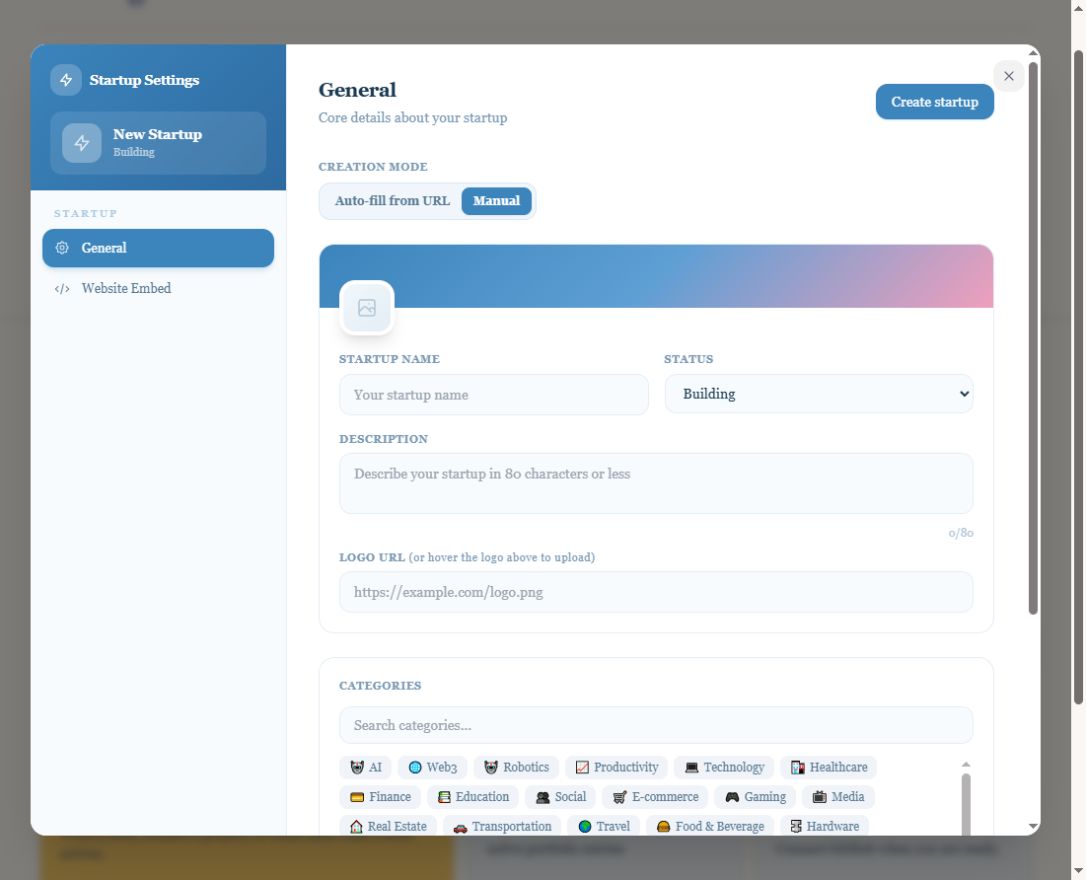
Open the startup creation flow and choose Manual. Enter the startup name, actual status and description.
- 03
Optionally provide a real logo URL or upload, categories and website URL. Enter revenue only when the user supplies verified figures.
- 04
Check the completed form before saving the startup. No publication date or review deadline is promised; record the actual public result after submission.
04EXPECTED OUTPUT
What gets published
A startup profile with product details and optional media, categories, website and revenue. Final publication was not tested.
Not suitable for
- Products that are not live or cannot be accessed publicly
- Products that clearly fall outside the destination eligibility criteria
The destination controls pricing, moderation and publication. DR is a recorded metric, not a guarantee of traffic or acceptance.
PREPARE. PUBLISH. FOLLOW UP.
Keep the work connected.
Use your website materials to prepare platform-specific content, record your submission and follow the published result.