 Submora
01PREPARATION CHECKLIST
Know the fields before you open the form.
Prepare the information below using the saved platform configuration. Required labels reflect that configuration; confirm the current form before submitting.
01
Start with your website
Required- Input
- Website URL
- Form step
- Add your project
- Requirements
- Use the actual product homepage. This is a natively required URL input.
02
Name
Required- Input
- Short text
- Form step
- Add your project
- Requirements
- Use the actual project name, up to 60 characters.
03
Tagline
Required- Input
- Short text
- Form step
- Add your project
- Requirements
- Up to 100 characters.
04
Screenshot
Optional- Input
- Image upload
- Form step
- Add your project
- Requirements
- PNG, JPEG or WebP up to 5 MB. Recommended for a complete page; the native file input is not required and no aspect ratio is stated.
- Image requirements
- Up to 5.0 MB · image/png · image/jpeg · image/webp
05
Category
Optional- Input
- Choose one option
- Form step
- Add your project
- Requirements
- Choose an actual category. The initial SaaS & Business selection is a UI default, not a verified product fact.
- Options
- AI & Machine Learning · SaaS & Business · Productivity · Developer Tools · No-Code · Design & Creative · Marketing & Growth · Analytics & Data · Automation · Mobile Apps · Web Apps · E-commerce · Finance & Crypto · Security & Privacy · Social & Community · Communication · Content Creation · Video & Media · Music & Audio · Photography · Gaming & Entertainment · Education & Learning · Health & Wellness · Sports & Fitness · Startup Tools · Open Source · Remote Work · CRM & Sales · Customer Support · Project Management · HR & Recruitment · Billing & Payments · Inventory & Logistics · Booking & Scheduling · Events & Conferences · Legal & Compliance · Real Estate · Travel & Lifestyle · Food & Dining · Fashion & Beauty · Parenting & Family · Pets & Animals · News & Media · Maps & Location · Transportation · Weather & Environment · Energy & Sustainability · Agriculture · Construction · Manufacturing · Research & Science · Non-Profit · Government · Other
06
Launch date
Optional- Input
- Short text
- Form step
- Add your project
- Requirements
- Optional native date input accepting today or later. Use the user’s default of within 48 hours for future launch-calendar planning when appropriate. Already launched products should leave this blank; the date does not guarantee directory approval.
07
About
Required- Input
- Long text
- Form step
- Add your project
- Requirements
- At least 40 characters for directory eligibility. Supports Markdown; no native minimum length, maximum length or required attribute is set.
08
FAQ Question
Optional- Input
- Short text
- Form step
- Add your project
- Requirements
- Optional repeatable FAQ question, up to 150 characters.
09
FAQ Answer
Optional- Input
- Long text
- Form step
- Add your project
- Requirements
- Optional matching FAQ answer, up to 600 characters. Leave unknown FAQs empty.
02PLATFORM REQUIREMENTS
Before you submit
- Actual website URL, project name up to 60 characters and tagline up to 100 characters
- PNG, JPEG or WebP screenshot up to 5 MB for a complete page
- About description of at least 40 characters for directory eligibility
- Google sign-in before final project creation; optional launch-calendar date and FAQ
The page explicitly says free to publish. No submission payment control inspected. Community points were granted by normal account creation but not spent; no paid purchase made.
03PUBLISHING WORKFLOW
How to submit
- 01
Open Add your project. The form can be prepared before login, but use the separate Sign in → Continue with Google to inspect the authenticated form before final creation.
- 02
Enter the real website URL, Name (60 characters) and Tagline (100). AI Autofill is optional and its generated name, category, description and screenshot should be checked; it was not used.
- 03
Add a PNG/JPEG/WebP screenshot up to5 MB, choose a relevant category, and write About using at least40 characters for directory eligibility. About supports Markdown.
- 04
Launch date is optional and accepts today or later for the launch calendar. Already launched products should leave it blank; the calendar date does not override directory review. Optional FAQ rows allow Question150 and Answer600 characters.
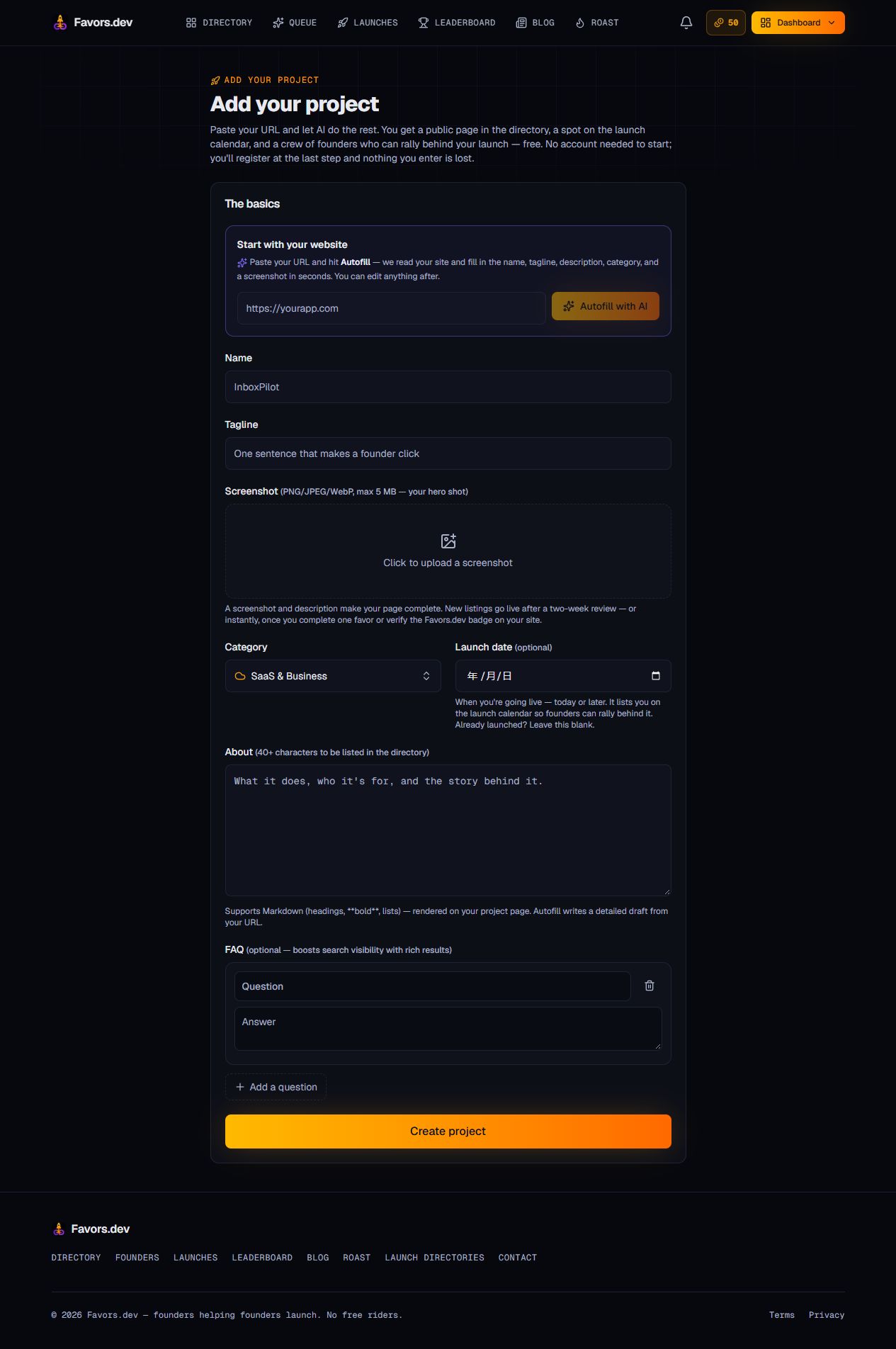
- 05
Review before Create project (Publish my project when signed out). Neither final button was clicked. New directory listings normally go live after a two-week review; completing one favor or verifying a site badge advertises instant listing. No favor, badge deployment or accelerated listing was performed.
04EXPECTED OUTPUT
What gets published
A product name, description, website link, and any product media accepted by the destination.
Not suitable for
- Products that are not live or cannot be accessed publicly
- Products that clearly fall outside the destination eligibility criteria
The destination controls pricing, moderation and publication. DR is a recorded metric, not a guarantee of traffic or acceptance.
PREPARE. PUBLISH. FOLLOW UP.
Keep the work connected.
Use your website materials to prepare platform-specific content, record your submission and follow the published result.