 Submora
01PREPARATION CHECKLIST
Know the fields before you open the form.
Prepare the information below using the saved platform configuration. Required labels reflect that configuration; confirm the current form before submitting.
01
Product name
Optional- Input
- Short text
- Form step
- Product Info
- Requirements
- Native required is absent; the step validator may impose additional requirements.
02
Tagline
Optional- Input
- Short text
- Form step
- Product Info
03
Website URL
Optional- Input
- Website URL
- Form step
- Product Info
04
Product description
Optional- Input
- Rich text
- Form step
- Product Info
05
Open source
Optional- Input
- Checkbox
- Form step
- Product Info
06
Categories
Required- Input
- Choose multiple options
- Form step
- Extra
- Requirements
- At least one, up to five. Empty selection was rejected by Continue. The inspected dropdown showed eighteen choices.
- Options
- Operating System · AI Notetakers · AI Presentations Software · AI Website Builder · Email Marketing Software · AI Voice Generator · AI Video Generator · AI Ad Generator · AI Image Generator · Marketplace Optimization Tools · Digital Business Card · Productivity · Finance · Saas · Accounting · Advertising · Advice · 3D-Technology
07
Product X URL
Optional- Input
- Website URL
- Form step
- Extra
- Requirements
- Despite the Handle label, the placeholder expects a complete X profile URL.
08
LinkedIn URL
Optional- Input
- Website URL
- Form step
- Extra
09
Founder note
Optional- Input
- Rich text
- Form step
- Extra
- Requirements
- Optional actual founder note. Leave blank if unavailable.
10
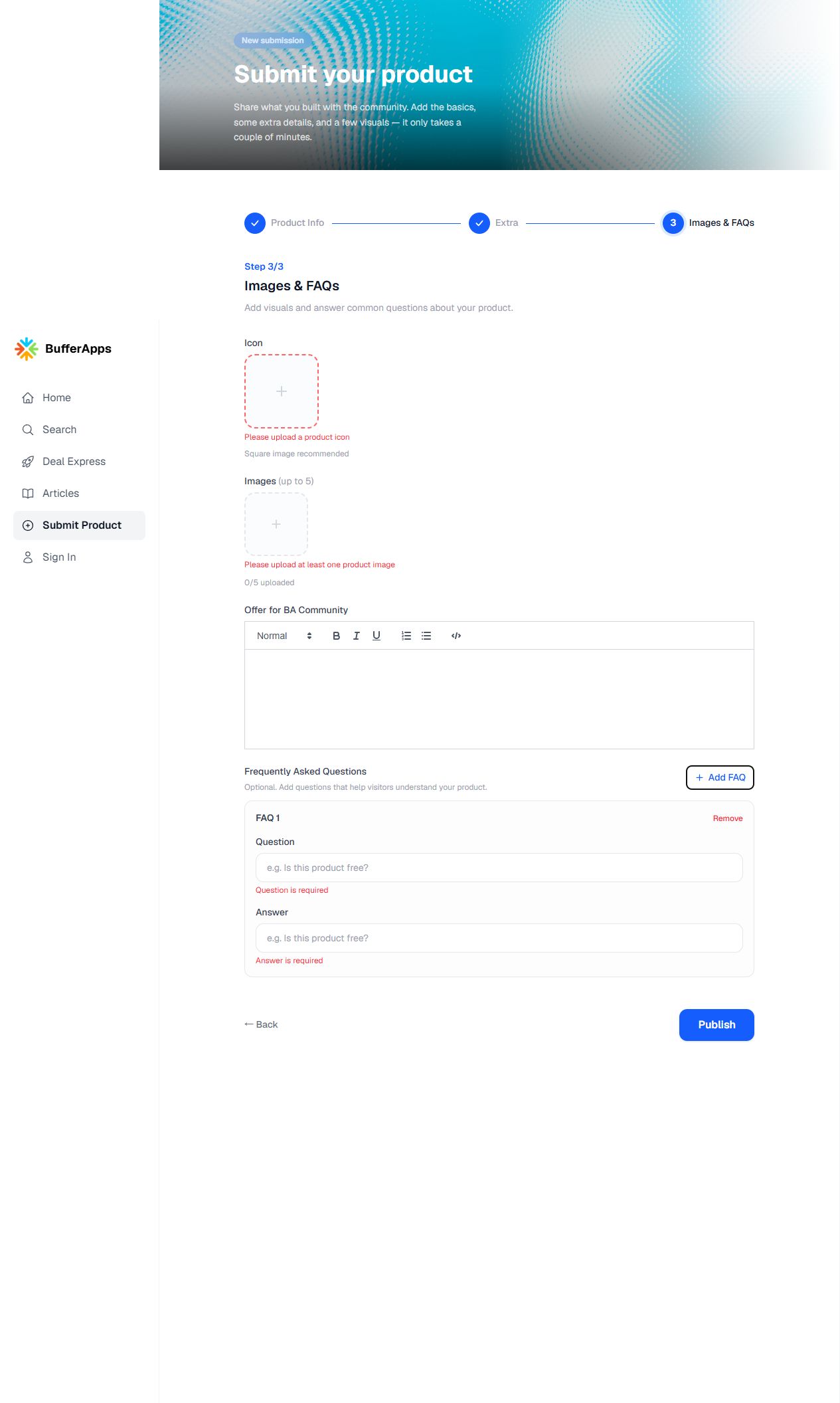
Icon
Required- Input
- Image upload
- Form step
- Images & FAQs
- Requirements
- The page asks for a product icon; square is recommended. Input accepts image/*, no byte limit is shown.
- Image requirements
- Confirm file requirements on the submission form.
11
Product images
Required- Input
- Image upload
- Form step
- Images & FAQs
- Requirements
- At least one, up to five. Inputs accept image/*; no byte or dimension limit is shown.
- Image requirements
- Confirm file requirements on the submission form.
12
Offer for BA Community
Optional- Input
- Rich text
- Form step
- Images & FAQs
- Requirements
- Optional real offer only. Do not invent a promotion or discount.
13
FAQ question
Optional- Input
- Short text
- Form step
- Images & FAQs
- Requirements
- Optional repeatable FAQ. After Add FAQ, both question and answer are required for that row. No row-count or length limit is shown.
14
FAQ answer
Optional- Input
- Short text
- Form step
- Images & FAQs
- Requirements
- Paired with the FAQ question; both are text inputs with the same placeholder, so fill manually within the correct row. Remove unused rows.
02PLATFORM REQUIREMENTS
Before you submit
- Factual name, tagline, website and description
- At least one relevant category (maximum five)
- Product icon and at least one image (maximum five)
- Optional FAQ rows must contain both question and answer
No fee is shown before Publish; final publication was not tested.
03PUBLISHING WORKFLOW
How to submit
- 01
Use the current Submit Product entry (/submit-product), replacing the obsolete /beta-listing/new route. No login was needed to inspect the form.
- 02
Fill factual Product Info. Open-source status is optional and must be true if checked.
- 03
Select one-to-five relevant categories. Optional X/LinkedIn URLs and founder note can remain blank.
- 04
Provide a real icon and one-to-five images. Optional community offer must be factual. Add FAQ only when needed; each added row requires both question and answer.
- 05
Review before Publish. The final action, any later account/payment requirement and publication timing were not tested. Record the actual result and public URL.
04EXPECTED OUTPUT
What gets published
A product name, description, website link, and any product media accepted by the destination.
Not suitable for
- Products that are not live or cannot be accessed publicly
- Products that clearly fall outside the destination eligibility criteria
The destination controls pricing, moderation and publication. DR is a recorded metric, not a guarantee of traffic or acceptance.
PREPARE. PUBLISH. FOLLOW UP.
Keep the work connected.
Use your website materials to prepare platform-specific content, record your submission and follow the published result.